RealPlayer does not Install correctly or Launch

Hello,
First I am a little irritated trying to find "CUSTOMER" support without a way to "contact" the service provider. As this is Community support, one can easily believe it wont be a high level support when you pay for a product.
Issue:
I was told there was a new version of RealPlayer. I installed it but since it has not worked correctly. My desktop icon is gone, I have tried to uninstall, clear the registry items of RealPlayer and reinstalled. It still does not install correctly or even put a desktop shortcut on my desktop. Even if I check the box during the installation process.
To make it worse, when I go down the file path to the folders, there is no .EXE files and just a Data folder. As I pay for Premium I would like to use this program as desired and not fight with it just to not have it work.
-
Offizieller Kommentar

Hello,
First, click on the link below to install and run the Microsoft troubleshooter. Run it a few times until you remove all Real and RealDownloader entries from the list.
http://support.microsoft.com/mats/Program_Install_and_Uninstall
Then, install RealPlayer in Safe mode by following these instructions: https://customer.real.com/hc/en-us/articles/231760587
NOTE: For more information on how to boot up your PC in Safe Mode, please consult this video: https://www.youtube.com/watch?v=L_N9riV8jl0; additionally, make sure to select the ''Network'' option under the ''Safe boot'' option: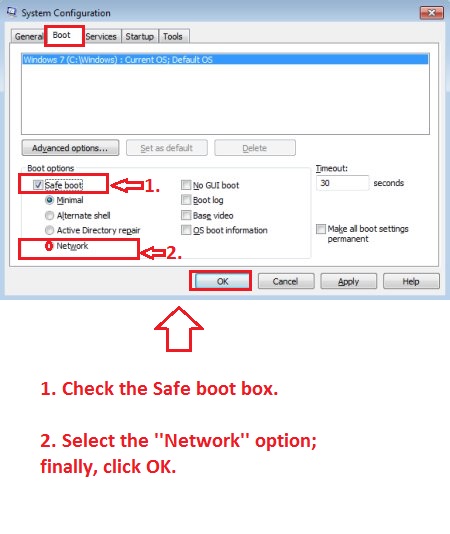
As for the provided support, we appreciate feedback from our clientele and continually strive to improve our processes.
Post ist für Kommentare geschlossen.
Kommentare
1 Kommentar