Realdownloader Crashes frequently

I am trying to download some videos from various web sites. Every 3 or 4 times I try to go to the pull-down I get a message that RealDownloader has stopped -- the separate window with the download queue and active download does not exit, download continues. I have to go to the notification tray and select "Restart RealDownloader - then it works for a few files and exits again."
I am running Chrome Version 62.0.3202.9 (Official Build) dev (64-bit), Windows 10 Build 16281. It worked fine until I updated to the current version of RealPlayer/RealDownloader from an older version.
-
Commento ufficiale

Hello,
1 - Please follow these instructions: https://customer.real.com/hc/en-us/articles/204040593
2 - If the issue persists, please uninstall and reunstall RealPlayer -- here's how: https://customer.real.com/hc/en-us/articles/204040013
-
I obviously already had a download location set - it downloads OK, it just crashes the component that works in Chrome to find and initiate the downloads.
I uninstalled, rebooted, installed... No change, still dies after I select almost every video.
0 -
Hello,
1 - Please uninstall and reinstall RealPlayer by following the steps below:
- First, you need to uninstall the program by following the instructions from this article: https://customer.real.com/hc/en-us/articles/204040013
- After uninstalling RealPlayer from the Control Panel, please delete the application folders. Here's how: https://customer.real.com/hc/en-us/articles/220342848
- Reboot your computer and reinstall RealPlayer. You can install the current version by going to: http://www.real.com/
2 - If the issue persists, please provide the following information:
- What Operating System is installed on your computer (Windows XP, Vista, 7, 8, 8.1, 10)?
- What version of RealPlayer is installed on your PC? (Here's how to check the version: https://customer.real.com/hc/en-us/articles/204039513)
- What steps do you follow and what difficulties do you encounter (or when does the program crash)?
- Do you receive any error messages? What is the exact message that appears on your desktop?
- Please send us screen shots showing the steps you follow and the results. To learn how to take a screen shot, please follow the steps from the article below: https://customer.real.com/hc/en-us/articles/204039473
The more specific you are, the better I will be able to assist you.0 -
Wow! You really don't read the postings in this forum at all, do you? I already responded that I had uninstalled and reinstalled RealPlayer, and I gave you all the versions (now out of date) in the original posting.
Chrome is now: Version 63.0.3213.3 (Official Build) dev (64-bit)
Windows is now V1709, Build 16288.1
RealPlayer is: V18.1.9.106
I have been reading these forums, and I agree with what I woould say is the general consensus - this program keeps getting slower and harder to use, and all you do is push your paid version, which I had before. Since the free version sucks so bad, why do you expect me to spend money with you?
0 -
Hello,
Try to download videos this way: https://customer.real.com/hc/en-us/articles/204040643
If the program still doesn't work as expected after the over-installation, please follow these steps:
1 - First, go to: http://support.microsoft.com/mats/Program_Install_and_Uninstall and install and run the troubleshooter, and remove all Real and RealDownloader entries from the list.
2 - Then, install RealPlayer in Safe mode by following these instructions: https://customer.real.com/hc/en-gb/articles/231760587
Note: For more information on how to boot up your PC in Safe Mode, see: https://www.windowscentral.com/how-boot-safe-mode-windows-10; additionally, make sure to select the ''Network'' option under the ''Safe boot'' option (for reference, see the attached screen shot).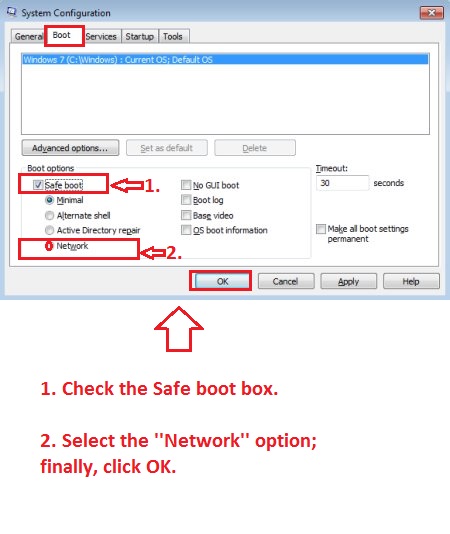 0
0
Il post è chiuso ai commenti.
Commenti
5 commenti