realplayer downloader

can't we download videos from YouTube
-
Commento ufficiale

We have noticed that YouTube is blocking videos from being downloaded at this time. There are other video hosting websites where you can still download videos from which suggests that the Downloader is still working and not broken.
We don't control websites hosting videos so there is very little we can do to force our Downloader to download videos. We will continue to investigate if there are other ways to download videos from these popular websites but at this time our only request is to be patient so these websites allow videos to be downloaded again.
-
We are aware of an issue and our engineering team is looking into it. We will email you as soon as it is resolved. In the meanwhile could you please provide us with the following information:
1. URL of the video you are unable to download.
2. Which web browser are you using to download videos?
We are able to download all videos in our lab so having this information will help us to identify the issue.
Also, can you please provide us with the following information:
1. Open a Windows Folder.
2. Go to C:\Program Files (x86)\Real\RealPlayer.
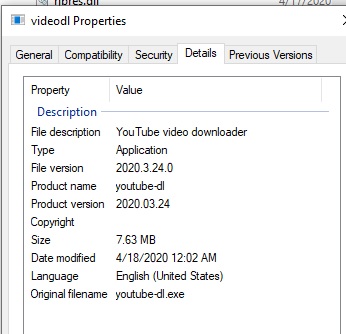
3. Look for a file named videodl.exe.
4. Right click on this file and click Properties --> Details tab
5. Please let me know what the file version reads as?0 -

Cant download any video from YouTube, Error = unable to download every time, every video.
example https://wwwyoutube.com.watch?v=iWiilOH4cQE
using Chrome or IE
the File version is 2019.11.5.0
Prod Name youtube-dl
last Mod 12/21/19
0 -

I paid the extra for the realplayer & downloader but CAN NOT download from youtube...???
so why? can you fix this or tell me how to fix it ???
windows 10
google chrome
and this is just one of many i have tired.
https://youtu.be/Ja4vgUmDhPA?list=PL-wSjtTmHz8QSfgKD-F6FVkLF8OQaKIVt
 0
0
Accedi per aggiungere un commento.
Commenti
4 commenti