3 suggestions for improvements in the latest version of RP

My system is a dutch Windows 7 system with 8 GB of memory. Still LOVE the program (think: video downloader).
See also the pictures attached.
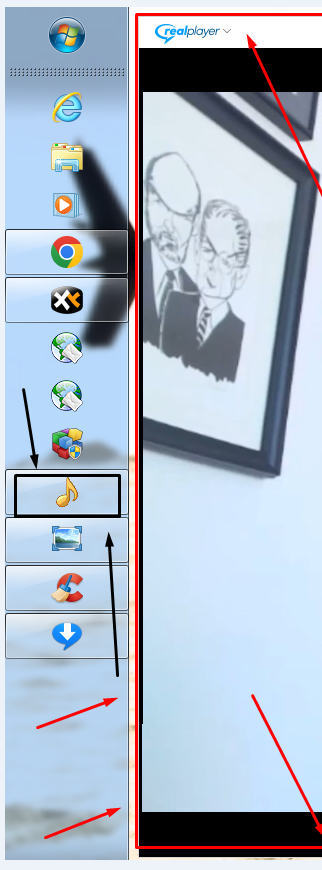
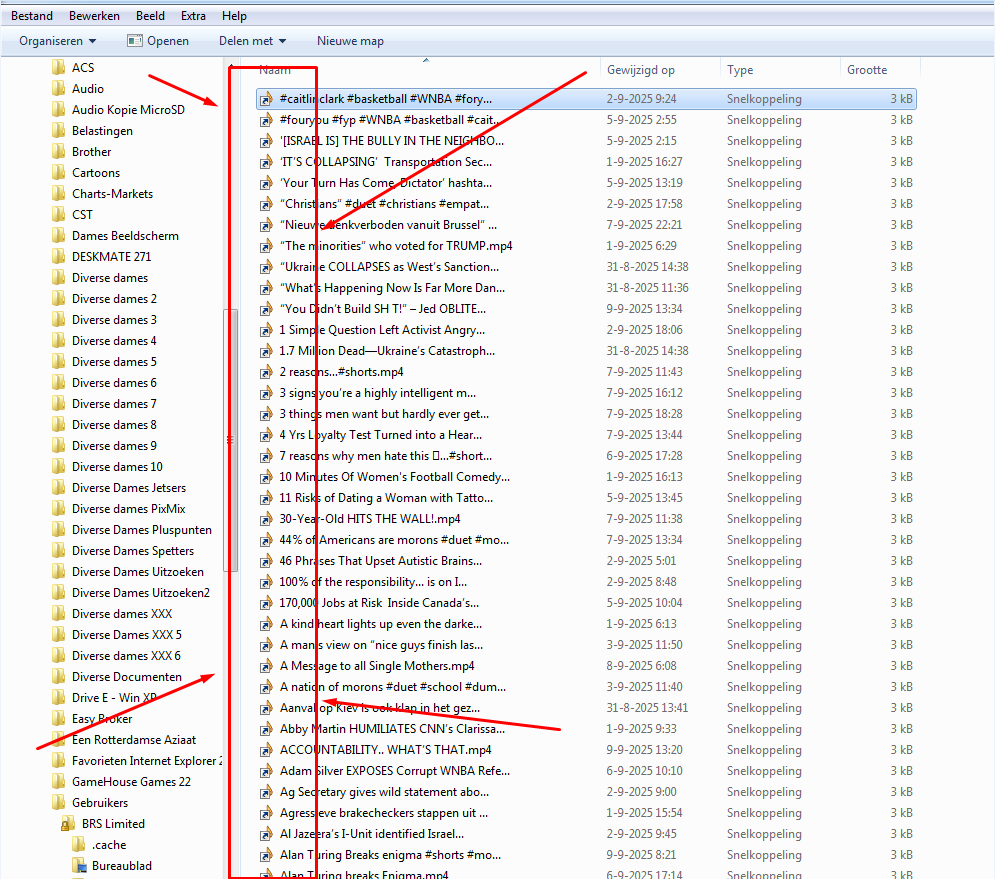
1. I cleaned, compacted the Windows registry and restarted Windows. Then RP, when playing a video, showed a different yellow musicnote icon on the taskbar for a while. It was not the usual blue RP icon. This yellow icon also showed up when I open a Windows folder with explorer with one or more e.g. *.mp4 videos in it. Then also the yellow music note showed up for a while. See the black arrows and rectangle in the picture.
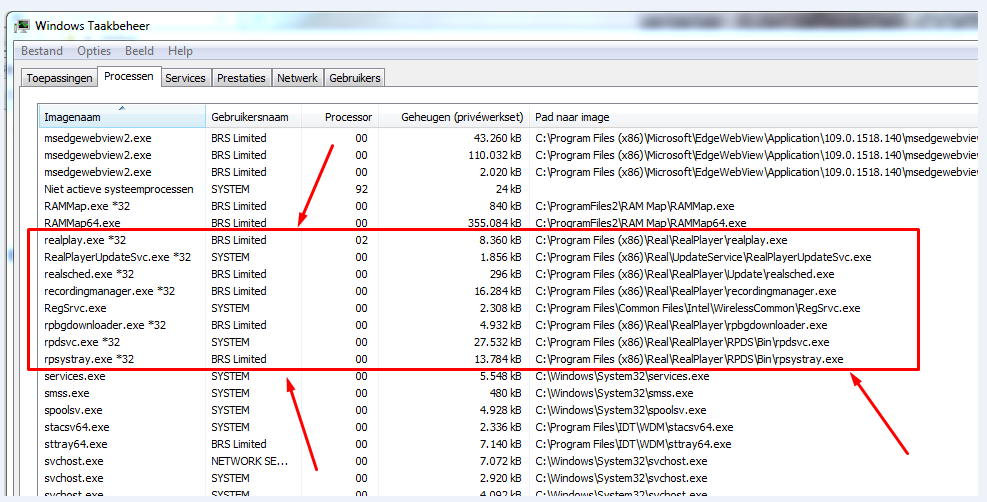
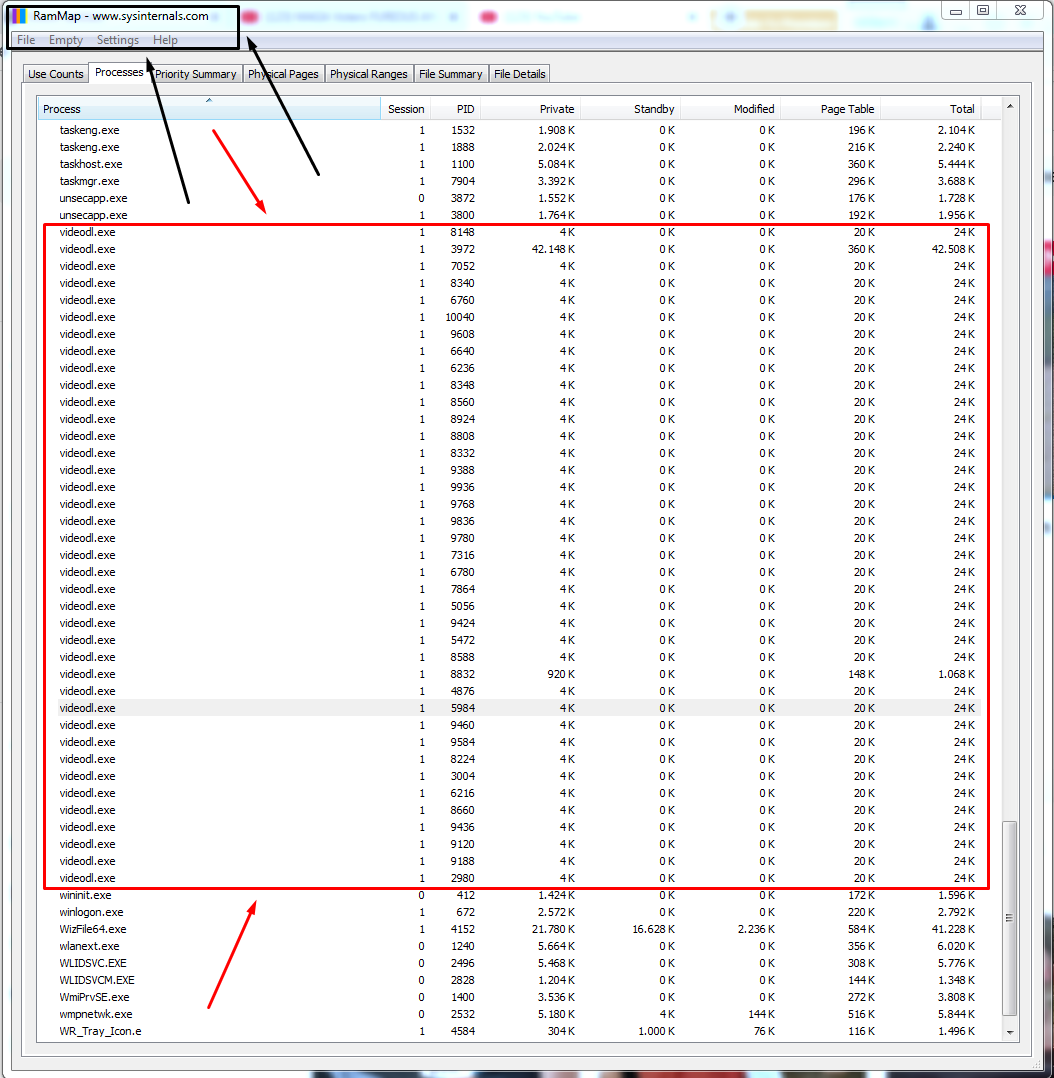
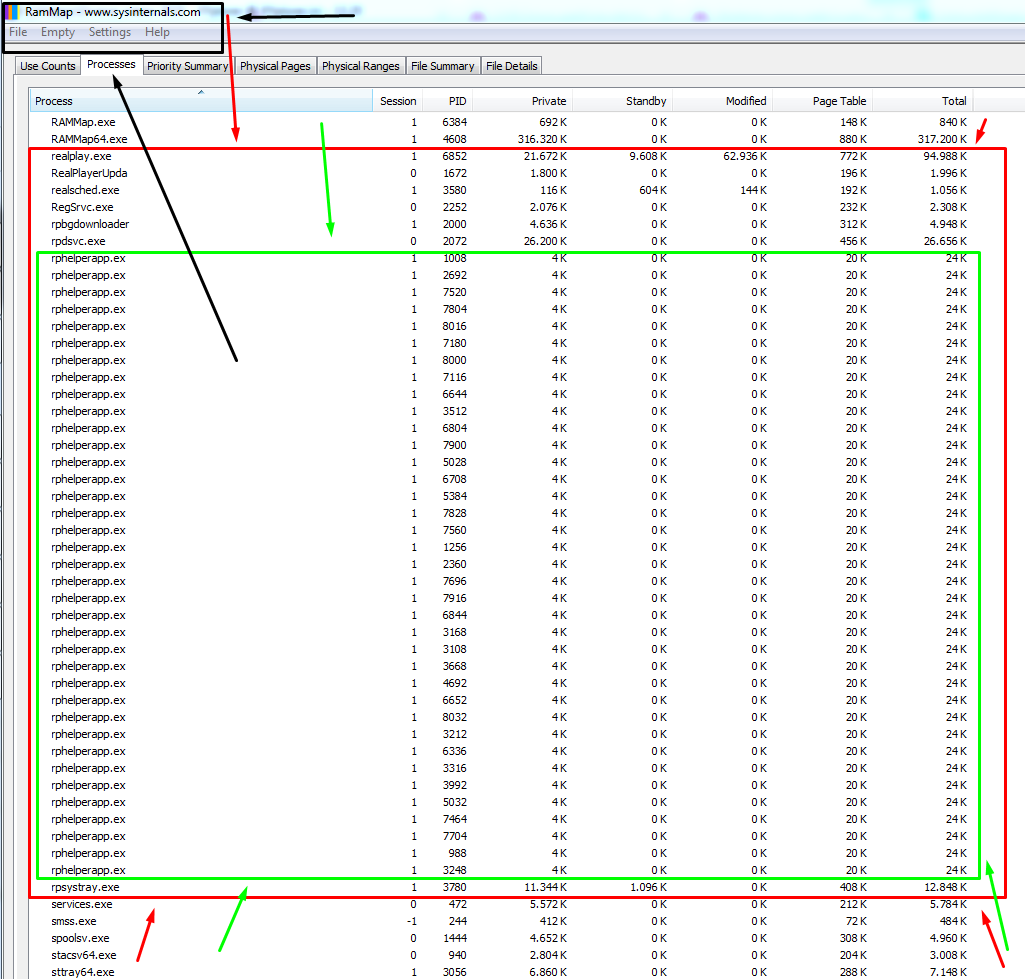
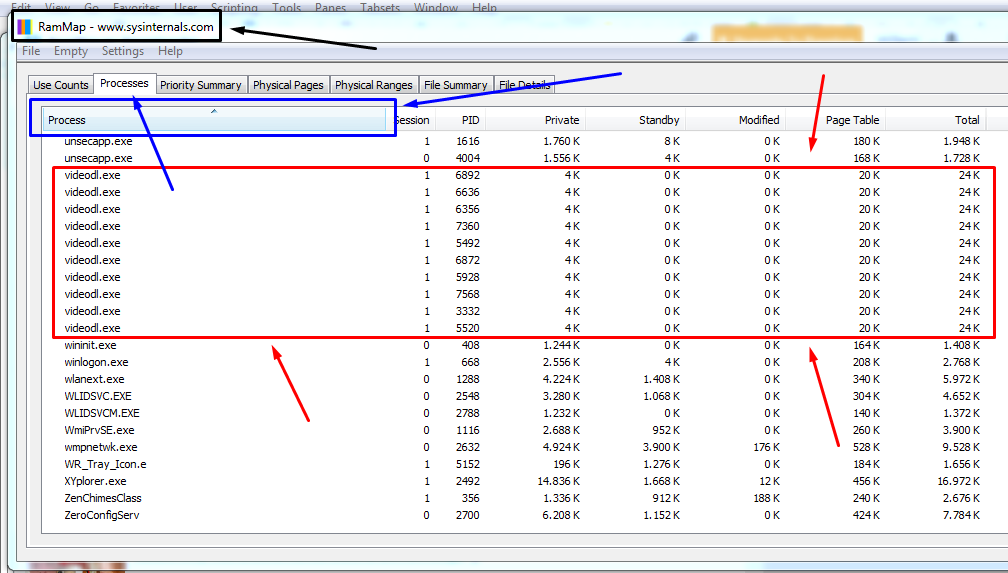
2. It seems that RP fails to end / close / de-ref / ..... (what is the proper term ??) 2 processes called "videodl.exe" and "rphelperapp.exe". In Taskmanager (dutch: Taak beheer") the normal RP programs show up but these 2 processes don't show up there. But in RAMMAP there are / can be multiple processes called "videodl.exe" and "rphelperapp.exe". Although all these socalled "Zombie processes" don't use that much memory (says RAMMAP) and CPU. It usually happens when I open several YouTube tabs in GOOGLE Chrome and download multiple videos. Then it seems that RP doesn't close these processes. Does RP "forget" to close these processes when no longer needed ?
Perhaps it's possible to improve the program code in such a way that RP takes better care of these 2 processes and close these processes when one or more of these processes are no longer needed.
Of course I have ZERO knowledge of how the program works and don't know what is possible and what's not. These "problems" could also be caused as a result of "interference" by / the combination of having installed / opened other programs at the same time on my Windows 7 system.
RAMMAP is a program from Sysinternals. See the black arrows and black rectangle in the pictures.
-
Commento ufficiale

This is a Windows issue and not related to RealPlayer. Please contact Microsoft
-
Extra question:
- Sometimes memory usage is over 80% (with several YouTube tabs open) on my 8 GB system. Is there a relationship between high memory usage and all the RP processes (e.g. Videodl.exe and rphelperapp.exe ?) Or is this a Chrome problem in combination with YouTube and Windows 7. I have still a Windows 7 system and as a result I have a version of Chrome (v109 (???)) which is no longer updated.
- RAMMAP (see the pictures above) can be downloaded from https://learn.microsoft.com/en-us/sysinternals/downloads/rammap
0 -
- Another suggestion: When the download part of the program has problems downloading as a result of changes at e.g. YouTube then at the top of the webpage a red line emerges with a message. Suggestion: add a date to that message on the red headline. Then users know when that problem showed up and when it was resolved.
0 -
- In the past I reported that the process "safrscan.exe" took up A LOT OF CPU. It still does after I enabled this Persons Search Indexer process in the latest RP 24. Perhaps this high CPU is caused as a result of a combination with another program installed / opened on my Windows 7 system ? E.g. I also have Window Media Player (this comes with Windows 7) and VLC player installed.
Would it help if I would provide a list with which programs I have installed on my Windows 7 system ?
This reminds me of that in the past (say 10 or 12 years ago) I had Apple's iTunes installed and that in combination with an other program (RP xx ???) CPU went through the roof. Removing iTunes solved the high CPU issue. (I hated iTunes !!! anyways). So, this could be a similar case. Perhaps these other players also try to create thumbnails of the videos stored on my HD / SSD with high CPU usage as a result ?
My default videoplayer today is RP 24 with all the latest updates. I only sometimes use VLC player because RP 24 isn't able to play e.g. *.wbem files and I stil have a few other special videoformats on my hard disk for which I need VLC player.
RP downloader works fine and I download predominatly download / pull in videos from YouTube. These videos are then converted to the *.MP4 format. But in say 1% of the cases a video is converted to a *.WBEM file / video or another odd video format. Did the creator of the video posted a video with a different format to begin with ?
Have been using RP since the year say 2005 because then 2 or 3 websites I regularly visited required me to have a RP plug in. And I still don't regret it using RP except for some SMALL problems. Tried other media players but I always came back to RP. No need (yet) to switch to another program.
0 -
- Another thing that can be improved.
- Windows records which files have been opened by creating a shortcut (*.lnk file). This includes *.mp4 files which have been opened by RP. But after cleaning the registry (see above) these shortcuts show a yellow colored music note, even after a week or three after cleaning the registry. I would have expected that I would see the usual blue RP icon (with the short cut icon) after a while. See also the picture below.
Are there other places where RP shows those yellow icons after cleaning the Windows 7 registry ?
I used first "MRU Blaster" and then "Eusing's Registry Cleaner" and then compacted the registry of Windows 7.
 0
0 -
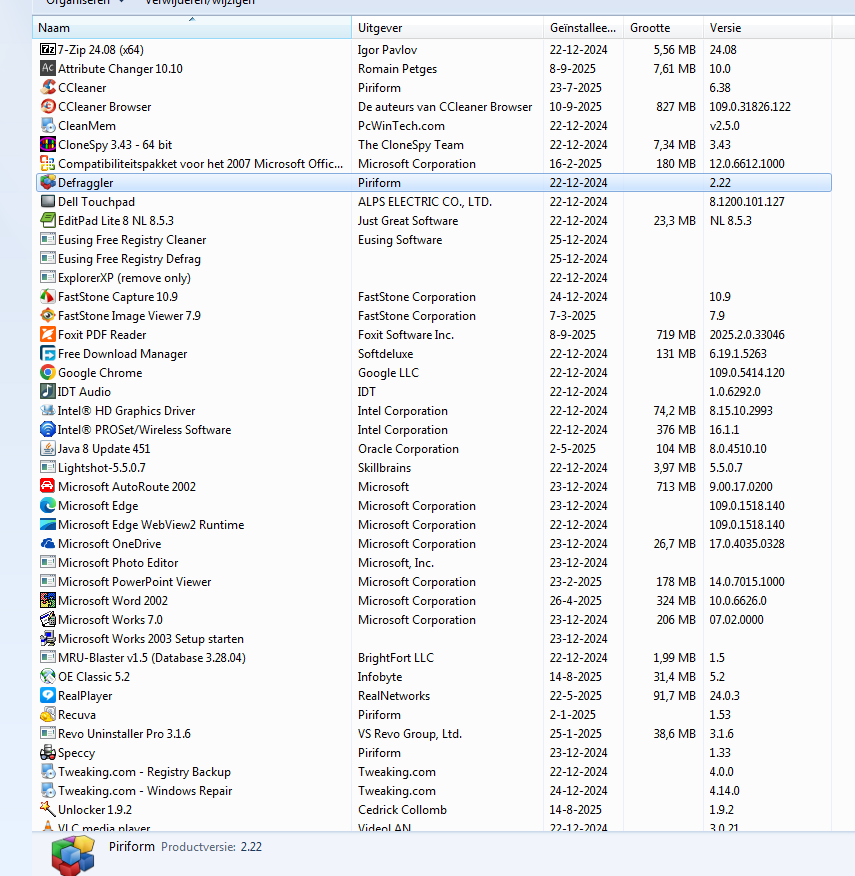
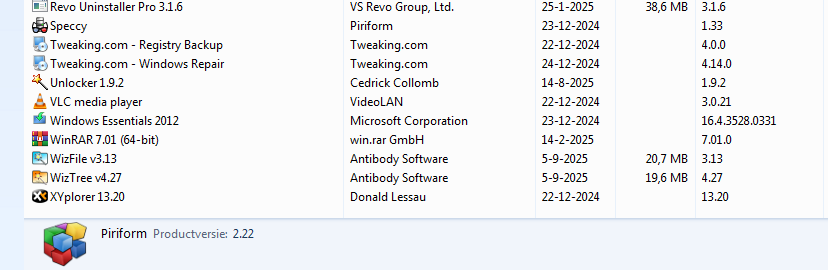
Below 2 pictures with the programs installed on my dutch Windows 7 system. I hope this will help to find out why the process "Safrscan.exe" uses up so much CPU.
 0
0 -
- Perhaps the developers can add support for *.webm files to the next version of RP ? I still have a few *.webm files on my SSD. For these files I need to use VLC player.
0 -
(I keep adding to this thread)
- The latest update for RP solved the problem I had with downloading videos from YouTube. But I needed to re-install RP before RP allowed me to update the latest (video) download extension. I assume that me cleaning the windows registry (see above) was the reason I had to completely re-install all the components of RP.
0 -
- It seems that the process "videodl.exe" no longer leaves socalled "zombie" processes behind. I noticed that each "videodl.exe" process continues to run for a few minutes / a minute (???) / seconds (???) (this is a rough estimate, didn't watch the clock ) after having finished a download. And then after a while - one by one - each process "videodl.exe" disappears. This can be seen in both Windows TaskManager and RAMMAP (Press F5 to update RAMMAP).
Hats off for the developers of RP for fixing this one ("non lethal") issue !!!! I hope this will improve the overall performance of RP.
(See above for a weblink to RAMMAP).
0 -
- I have to withdraw a previous comment I made in this thread. See the pictures below.
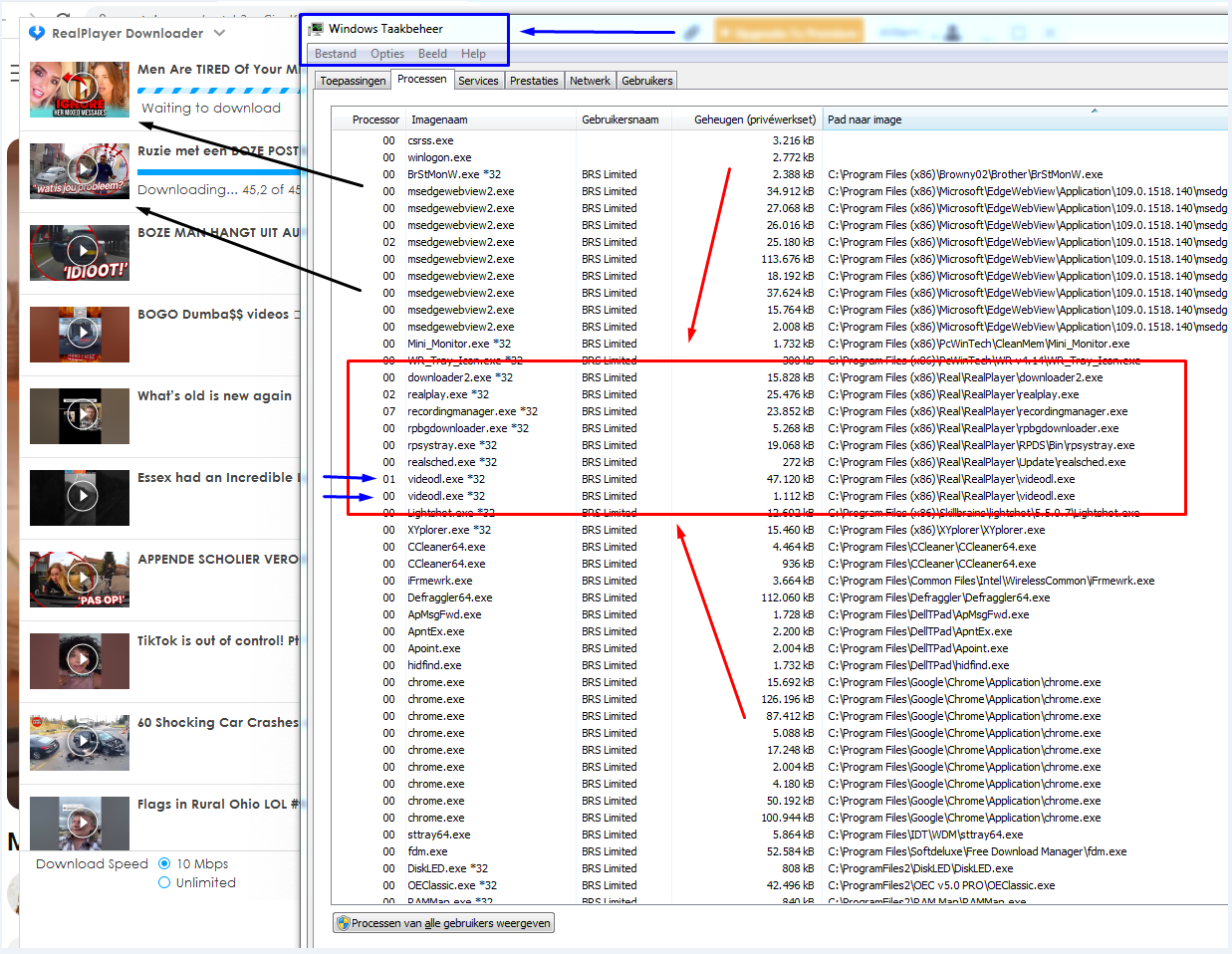
In the 1st picture there are 2 downloads busy & waiting to be downloaded (2 black arrows). As a result there are 2 processes called "Videodl.exe" (2 blue arrows) in Windows TaskManager (dutch: "Taak Beheer", blue rectangle). When these 2 downloads are finished then these 2 processes disappear from TaskManager.
(Turn to the 2nd picture:)
However, RAMMAP (black rectangle) still shows that there still 10 processes running called "videodl.exe" (see inside the red rectangle). I would have expected that RP would have fixed this "Zombie" problem. Still to be fixed in the/a next version of RP.
 0
0 -
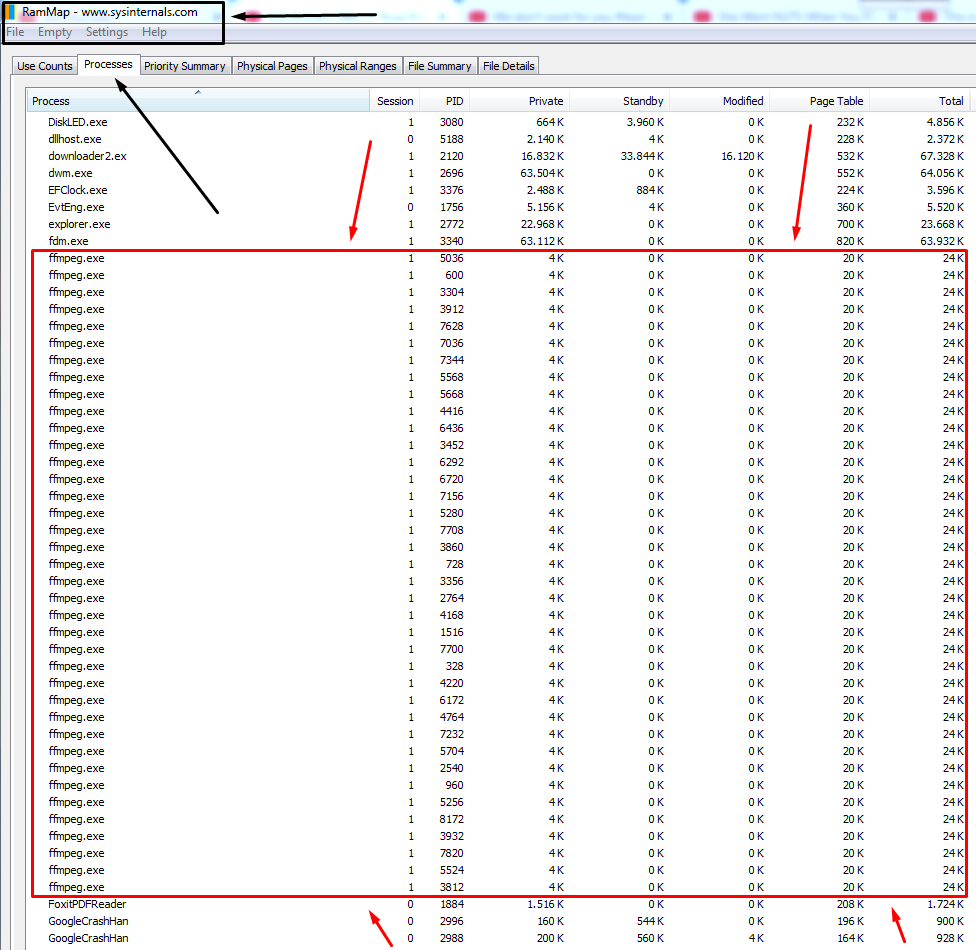
- The developers of RP must address another RP "Zombie process" problem. RP can open / opens a process called "ffmpeg.exe". When a download has finished downloading a video then this process (processes ???) disappear(s) from "Taakbeheer" (english "Taskmanager"). But RAMMAP shows (under the tab called "Processes" that these processes keep running as a "Zombie process". See also the picture below. See above for more information about RAMMAP.
 0
0 -
(I completely rewrote this post)
- I need to add something to my previous post in which I reported about the "Zombie Process" called "ffmpeg.exe". These processes "ffmpeg.exe" (plural) keep running even after I close the main RP media player GUI and the separate download pane/window. Taskmanager doesn't show these processes anymore. RAMMAP then does show those processes. I have to close the RP system tray icon as well to end all these "ffmpeg.exe" processes. Only then these processes disappear from RAMMAP as well.
- When I click on a *.mp4 then RP the starts the e.g. "Realplay.exe" process but also 2 processes called "ffprobe.exe" and "ffmpeg.exe". It seems that RP starts these 2 processes when "realplay.exe" starts. It seems that these 2 processes run for a short while and then shut down again. I was able to see them because these processes showed up in RAMMAP and remain running. These 2 processes seem to not close themselves down.
I have ZERO knowledge of what should or shouldn't be running and when those processes should be running and for how long. I am simply reporting what shows up in Task Manager and RAMMAP and I do think this problem should be fixed in the next version of RP.
0 -
- Another thing I don't like:
When I play a *.mp3 file then the GUI of RP is similar to what is shown in the 1st picture.

When I reduce the height of the GUI to the minimum height the color of the GUI changes to white without any information displayed. The only thing that is shown is the header of the RP GUI. See picture below.

- Suggestion: make sure that when the RP GUI has the minimum height, the GUI still displays the information of the *.mp3 file as shown below. This kind of GUI was ditched in one of the previous versions of RP. I only recently discovered this behaviour of the GUI.
 0
0 -
(I keep adding to this thread)
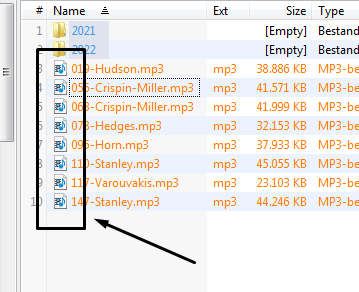
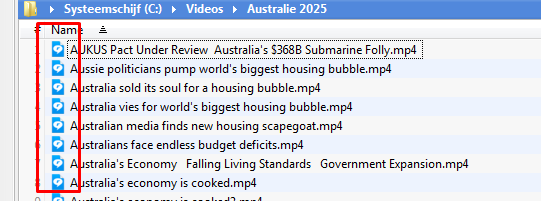
For a *.mp3 files a different icon is being displayed than the usual standard blue RP icon. Is this normal ? This standard blue RP icon does show up for a *.mp4 file. See the pictures below. To be fixed in a future version ?
 0
0 -
- There is another thing in the program of Real Player (RP) version v24.0.3.312 that can be improved in the next version of RP.. When I open a *.mp4 file with RP then RP creates a *.lnk" file in the folder "c:\users\BRS Limited\AppData\Roaming\Real\RealPlayer\History". ("BRS Limited" is my Windows account name).
When I use one of those *.lnk files to open a *.mp4 file and the file still exists then RP opens the file in RP. Then RP shows/displays NOT the usual standard blue RP icon (See my previous post in this thread) but a yellow music note icon on the task bar on my Windows system. See also the picture in the 1st post in this thread for an example of that. I think RP needs to update the "association" in the registry every time the user opens a file that be played with RP. Is this normal or a bug in the RP program code ?
0 -
- See the picture attached.
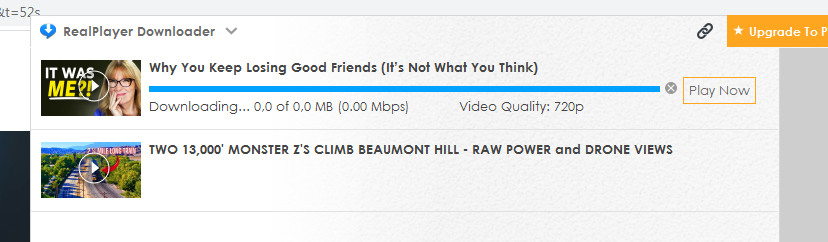
Previously when I downloaded a video from YouTube a progress bar showed up together with a % both indicating how much of the video was downloaded and at what speed the video was downloaded.
Now the behaviour has changed:
1) First the message "Waiting for download" shows up.
2) Here the big change has taken place: Then something like in the picture below shows up. Then the blue progress bar (like in the picture) suggests that the video is already fully downloaded. But the text under that blue bar says "Downloading... 0.0 of 0.0% (0.00 Mbps)" during the entire download of the file. It seems Youtube has changed the program code once more.
3) Then a text "Importing file" shows up. That's is the sign that the program has downloaded the entire video and needs to do some sort of conversion.
Don't know if this behaviour can be changed back to the previous behaviour with a change of the RP program code.
Another thing that has changed is that when I want to download a video then the audio is regularly no longer in english or dutch. Then the language that comes with the video is e.g. french, italian, japanese, portuguese or some other language I can't identify. Here I also don't know if a change of the RP program code can fix the problem. Is there a connection with the option in the RP downloader to have a english subtitle ?
FYI: My native language is dutch and I am reasonably fluent in english. I have no problem reading, writing english and listening to english. That's why I don't like that the videos downloaded with RP from YouTube come with a different language spoken other than dutch or english.
 0
0 -
- I tried to download a video file and all the problems as described in my previous post seem to be resolved. (Knocking on wood). Will test the updated version of the RP today and later (this week) even more. Fingers crossed.
- Now I think I know how RP updates the videodownload part of the program. RP (24) seems to have an "update service" running and that allows RP to push an updated version of a file to a RP user. I noticed that the date stamp on the file "videodl.exe" was updated to a day and time today. Hats off for RP.
0 -
- First I thought that the new program code - as installed 2 (??) days ago - had a flaw in the code and that as a result of that RP only would take / prefer / select the dutch audio track. But I found out that YouTube allows the user to choose the language of one's choosing. So, I turned the dutch audio off and the english audio on. Problem solved !
0 -
- Some 40 minutes ago I opened RAMAP and then Chrome, opened 8 YouTube videos and downloaded them with RP. During the download of these 8 videos I watched what Task manager and RAMMAP reported. There were a number of processes called "videodl.exe" running. But RAMMAP also reported that after all the 8 downloads were finished, after say 1 or 2 minutes there was no longer a process called "videodl.exe" running. Not it "Task Manager" and not even in RAMMAP.
Thumbs up for the latest version of "videodl.exe" (???). This one "Zombie" has been eliminated.
0 -
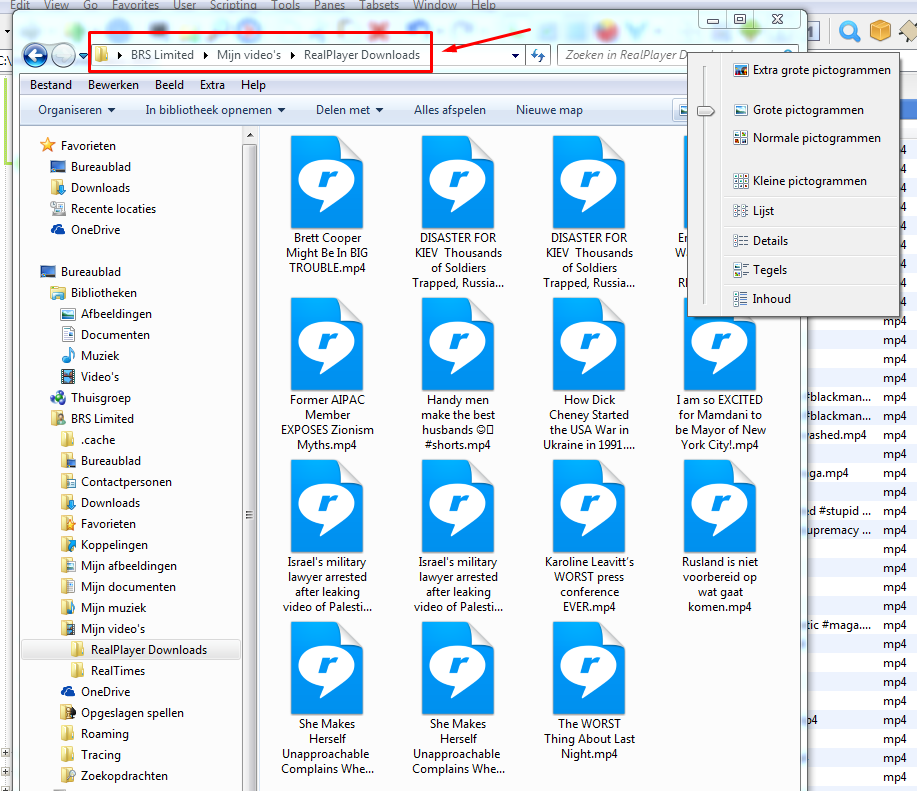
- Has there been a change in the program code of RP ? RP has been for me the default media player for *.mp4 and *.mp3 files since the year say 2005. But when I open a folder with *.mp4 files in it then Windows (7) no longer shows a screenshot / an image of the video that gives the user an indication of what the content of the video is. Instead Windows ("explorer.exe" ???) (7) shows only the blue RP (24 ??) icon. See the picture attached for an example.
- Or is this problem related to a lack of free disk space ? Does tihsi feature require a certain amount of free disk space ?
 0
0 -
- I think I have eat some humble pie. I opened 11 YouTube tabs in Chrome and downloaded 11 videos from there. After having downloaded these 11 videos I opened RAMMAP and I counted 14 "zombie processes" called "videodl.exe" (See above). In Task Manager there were no processes called "videodl.exe". After a few minutes there were still 11 "zombie" processes "videodl.exe" running (in RAMMAP). So, 11 "zombie processes" for 11 downloads. Makes perfect sense.
- When RP 25 (!!!) start downloading a file / video then a separate blue RP icon on the task bar. It signals that a separate process has started ("recordingmanager.exe" ? "rpbgdownloader.exe" ? or both ?). It seems that all the 11 zombie processes only will be terminated / ended when I close the "Realplayer Downloader" window and blue RP icon disappears from the taskbar. I was hoping that these 11 zombie processes would close / end all by themselves without the need of having to close the "RealPlayer Downloader" window.
- I still see A LOT OF zombie processes called "ffmpeg.exe" and "rphelperapp.exe" (in RAMMAP). To be fixed in a next update for RP 25 ?
0 -
(I keep adding to this thread)
- The recent download problem with YouTube is indeed fixed. I was already able to download videos from YouTube for a few days. I knew there was an update ready for "download.exe" because it showed up in a program called "Defraggler" and I assume this file was downloaded with RP download Service (running in the background)
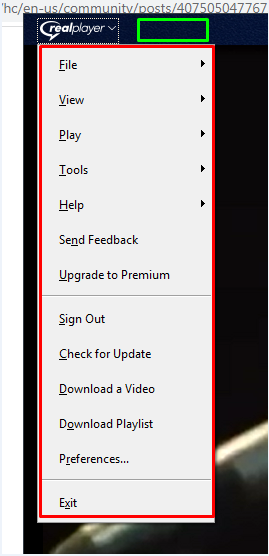
- Recently I started to use the RP (25) playlist feature. But accessing / opening the RP playlist feature is a challenge on its own. (Did I overlook something in the main GUI of RP ??) That's why I have another suggestion for a / the next version of RP version 25. I would recommend to add one or more buttons on the main RP GUI to enable / open the "Media Player Playlists" GUI / feature / part of the program. See the picture for where this button / these buttons could be placed. E.g. either in the green rectangle or/and on the roll down menu inside the red rectangle). Or somewhere else in the GUI ??
 0
0 -
Another problem with the GUI (or is this problem located deeper ?) of RP. After updating RP 25 with the latest "download.exe" file (see my previous post), RP failed to react to clicking the "Replay Off/On" button in the main GUI of RP. No matter how many times I clicked on that button, RP remained in "Replay Off" mode. The color of the button changed from white to grey (and back) each I clicked on that button RP but RP remained in "Replay Off" Mode.
What is the cause of this ? Cleaning the registry (with a program called "Eusing's Free Registry Cleaner") ? Or opening the RP "Playlist" feature ? Or as a result of "interaction" with another program ? Updating the program with the new update/file ? ................... ?
I had to "fiddle around" with the program for a while / more than a little bit to get this button working again. I don't know what precise action got this button working again. Was it (re-)starting the program a few times ? Or playing a few videos ? ................. ?
I remember that this problem also existed in previous versions of RP. But I don't remember in which version this odd behaviour started.
To be fixed in a future version of RP (25) ?
0 -
- Are there other existing ("hidden" ???) features in RP (25) that are important enough that they deserve to have a separate entry/button in the "roll down" / "drop down" menu on the top left hand side of the GUI ? Or an additional button next to the "Real Player" button/drop down menu. (See also a previous post in this thread).
0 -
- Are there other buttons in the main GUI that are (temporarily ??) disabled when RP sends over a new file with the RP update service ? Perhaps also deeper in the "roll / drop down" menus ?
0 -
- In a previous post I reported that the button "Replay On/Off" refused to work for some time after "Download.exe" was updated in the background. I know that in the past I had to do also some / (A LOT OF ??) fiddling to get that button to work. But - as far as I know and can remember - back then RP had no "RP Update Service" running in the background. Then one had to manually check and install manually a new version of "Download.exe" every now and then.
- After some time digging into my own memory I realized that I had this "Replay off/on button" problem also (temporarily) surfaced each time I installed a new full version of the RP package. With that I draw the conclusion that the cause of this odd behaviour could be traced back to the main part of the RP program. Perhaps in combination with the actions of the RP "Update Service".
(I am just reporting what I see/saw and remember(ed) so far of past & current behaviour and try to narrow down where the problematic behaviour could be located).
- Keep in mind: I have been using RP since say the year 2004 / 2005 when I regularly visited 2 websites that required me to have a RP plug-in to be able to play an audiofile. So, I have seen all the changes in the program. Both for the worse and for the better.
0 -
- Hats off for the latest version of RP 25. After installation the "Repeat off/on" button now works the first time I use that button. The default after installation is "Repeat off" and I was able, with only one click, to turn on the "Repeat" function.
0 -
About the "Zombie processes" (see above):
I use another program on my Windows 7 system called "Defraggler". This program also produces - over time - A LOT OF those "Zombie processes". This program contains both a 32 bit and 64 bit version packaged into one program. On a 64 bit system (I have such a system) the program installs a 32 bit and a 64 version of the program. Here come the problem. The 64 bit system regularly runs the 32 bit version of the program for a short while and then seems "to forget" to properly close the 32 bit version of the program. This can be seen in Task Manager.
Perhaps something similar is plagueing RP as well ?
0 -
- Another thought about these socalled "Zombie Processes". Sometimes RP fails to download video from YouTube and then displays the message "Unable to download". Perhaps there is a relationship between these "zombies" generated by RP and the failed downloads ? If so, then it certainly would help to "stabilize" RP 25 if the developers of RP would fix the generation of these "Zombie Processes".
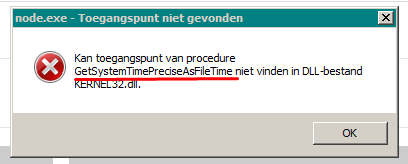
- Every now and then I get an error message that tells me that the RP file "node.exe" can't find the API entry point "GetSystem....... " in "Kernel32.dll". See also the word undelined in the picture attached. The texts in the window are in dutch and the red underlined text is the name of the API (in english).
 0
0 -
Another thought:
One way I am able to download videos after generating a "Unable to download" error, (see previous post) is to close the download manager and restart the same download manager window. As a result of closing the download manager all the "videodl.exe" "zombies" disappear. That will close all the "videodl.exe" zombie processes as well. That's why I believe that solving this "zombies program" problem would also this one "unable to download" error.
0
Il post è chiuso ai commenti.
Commenti
30 commenti