Upgrade to 20.0.6.304, it scans for media even after being explicitly told not to scan

I, literally, just upgraded to RealPlayer 20.0.6.304 and I have a serious issue.
I have set my preferences to NEVER scan for media and yet when I start RealPlayer it scans my disk for media and tells me nothing was found. This is NOT an acceptable behavior. If my preferences are set to never scan, then NEVER SCAN.
This is a bug in RealPlayer and needs to be fixed ASAP because it causes me to have to wait about 3 minutes before is finishes the scan to allow me to do anything in RealPlayer.
-

Can you please go to RealPlayer Preferences and ensure there is nothing under "Watch folders". To open RealPlayer's Preference, you can follow these steps:
- Open RealPlayer.
- Click RealPlayer logo on the top left corner and click Preferences.
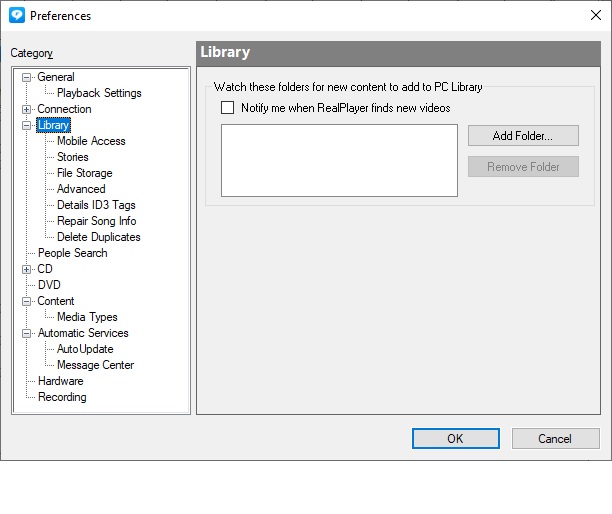
- Under Library --> Delete anything that shows under "Watch these folders" and uncheck "Notify me when RealPlayer finds new videos".
- Click OK.
If it still is scanning for media, please let us know.
0 -
I had already deleted all directories in the box and turned off the notify flag.
0 -
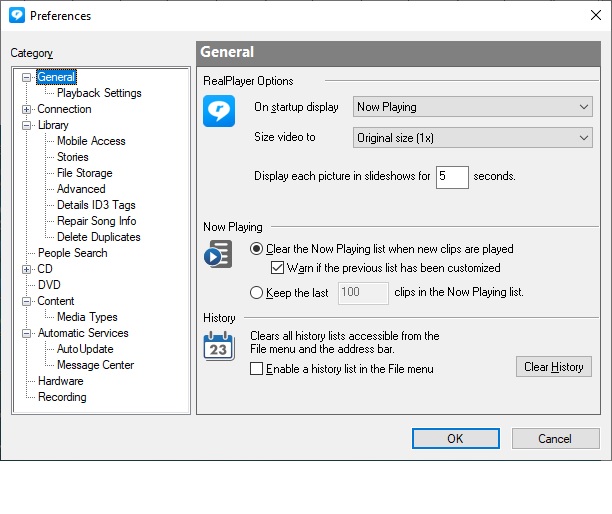
Another thing, and it may or may not be related, but the preferences appear to be being ignored.
I have the setting to start in Now Playing but it ALWAYS starts in Library.
This is really unacceptable.
It's bad enough that it always scans for media when I start RealPlayer, but it isn't starting where I told it to.0 -
Can you please send us a screenshot of your Preferences --> Library?
To change the way you want RealPlayer to open, can you please let us know if you are following these steps?
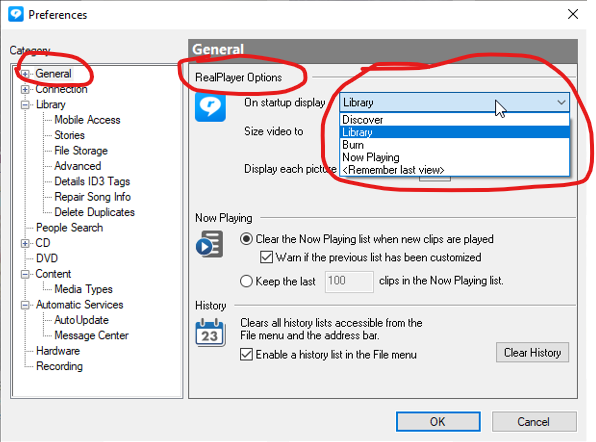
- Under Preferences --> General --> RealPlayer Options, you can choosing the tab you want RealPlayer to open each time?
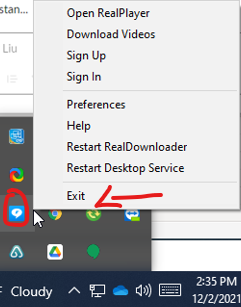
- Close RealPlayer completely including exiting from the taskbar (shown at the bottom right corner)
- Restart RealPlayer
See screenshots below.
 0
0 -
Here are my "General" and "Library" settings
 0
0
Il post è chiuso ai commenti.
Commenti
5 commenti