I Upgraded to PREMIUM, but Realplayer still shows PLUS instead of PREMIUM

Hi,
Some months ago, I buyed the Realplayer PLUS Subscription, and a few weeks ago, I upgraded to the PREMIUM Subscription.
But when I open Realplayer, it still shows “PLUS” instead of “PREMIUM” when I click on my name to see my payed plan.
And however, if I click on the “PLUS” menu option, it displays another window with the Subscription Plans,
and on that window, the PREMIUM plan is correctly labeled as my Current Plan.
Could you help me to make my Realplayer detect correctly my current plan PREMIUM, please?
(so I can download Youtube videos with auto-generated and auto-translated subtitles).
Thank you in advance. Best Regards.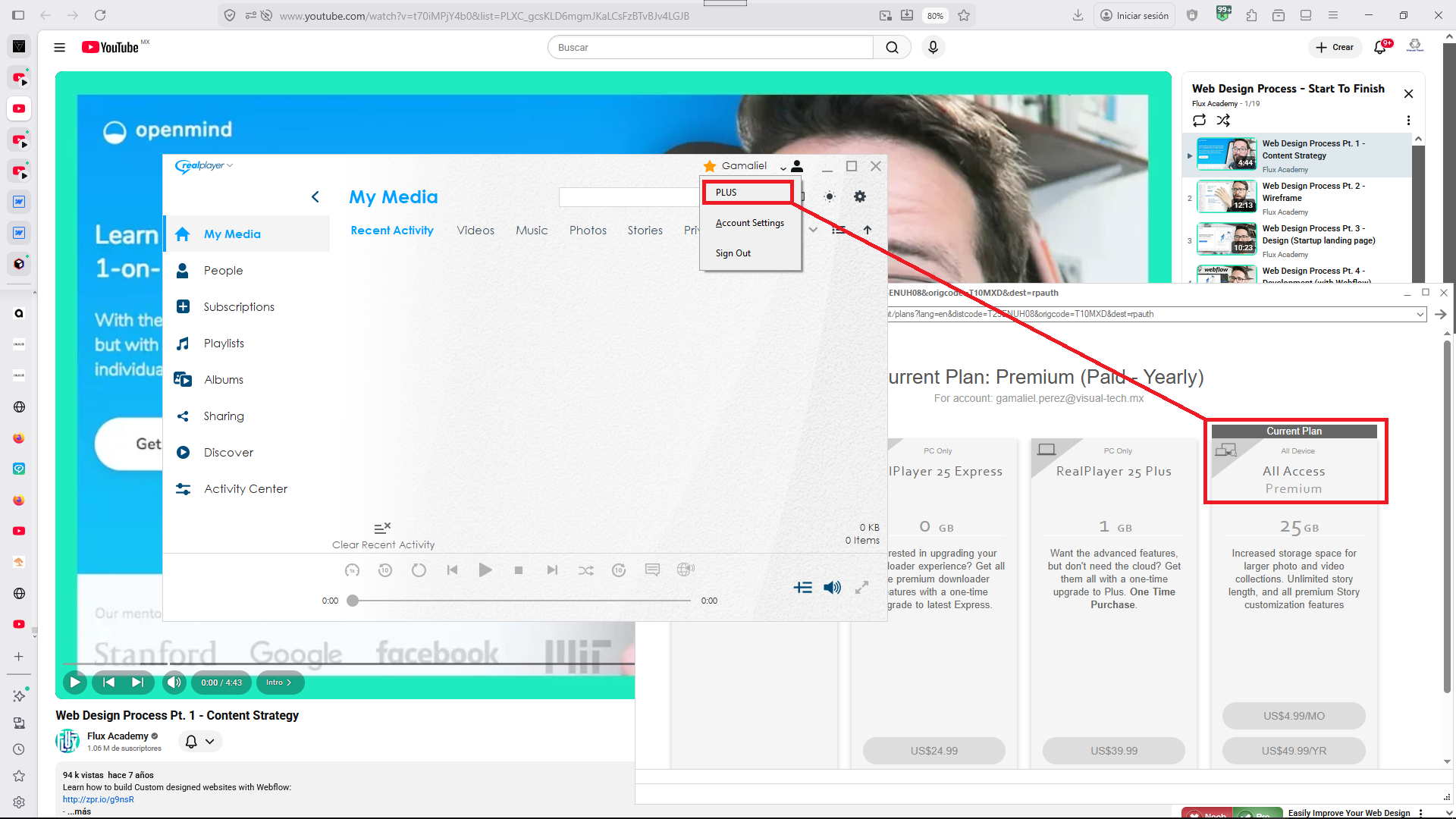
-

The Downloader only knows what you paid for by your Downloader Sign-in. Try signing off of the Downloader and Signing back on to the Downloader and see if it now recognizes the Premium version. Good Luck.
0 -
Hi Michael, thank you very much for your kind answer, I already tried several times, Sign-Out and then Sign-In, hoping Realplayer would update my account Plan, but it still shows "PLUS", instead of "PREMIUM", and therefore, it does not download Youtube videos with auto-generated and auto-translated subtitles.
Perhaps is there another way to make Realplayer recognize the actual Subscription Plan of my Account?
Thank you in advance. Best Regards.0 -
Gamaliel, no one can download videos or music files with the Downloader, because the YouTube Developers made a software change once again that broke the Downloader. We all have to wait until the RealPlayer Developers put on a fix to resolve the problem. I sent them an email and hopefully they now know that their product is down. When the Downloader program is fixed, you will be able to download again. You can download videos with auto-generated and auto-translated subtitles. It will just create a video without a .srt file which is a subtitle file. When the file you're downloading doesn't say auto-generated or auto-translated subtitles, then the downloader will create the .srt subtitle file with the video (2 files). I know it's frustrating, but we all have to wait for them to fix the problem. Best regards.
0
Il post è chiuso ai commenti.
Commenti
3 commenti