Advertisement Gets in the way

When I have a video that I want to download with the RealDownloader. The little drop down prompts me to "Download this Video." I click on it and the downloader appears. But, before anything can start this pop up advertisement asking me to upgrade to premium RealPlayer 18 plus for 39.99. I print screen my page to show what's basically going on.
Right behind that is the RealDownloader screen but even after I "X" out of it, it still doesn't load anything even though the video is right behind the RealDownloader. I've turned on my pop up blocker and that doesn't stop the advertisement from popping up. I'm not sure what to do or how to get ride of the advertisement.
-
공식 댓글

Hello,
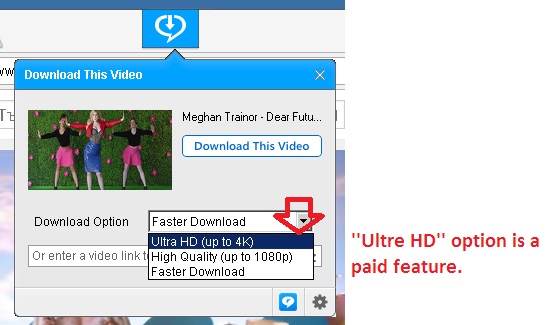
Please make sure that you didn't selected the HD download option (as this is a paid feature). Instead you can open your browser, find the video you want to download, then click on the drop-down download button in the middle of the screen (see how the button appears: https://customer.real.com/hc/en-us/articles/204040623). After clicking on the download button, the ''Download This Video'' window will be displayed. You just need to select the ''Fasted Download'' option and finally to click on the ''Download This Video'' option; see the screenshot:
댓글을 남기려면 로그인하세요.
댓글
댓글 1개