Downloading from several websites is no longer working.

Thank you for your continued support.
After updating to the latest version last night, I can no longer download videos from TVer (a Japanese TV streaming service) or YouTube, even though I was able to do so before the update. (I am also still unable to download videos from ABEMA, another Japanese streaming service, as before.)
The download button appears as usual, but when I click it, I receive a message saying, "Unable to download."
I have also tried different browsers (Google Chrome, Firefox, and Microsoft Edge), but the same issue occurs in all of them.
I understand you are busy, but I would greatly appreciate it if you could investigate and fix this issue.
Thank you in advance for your assistance.
-

Can you please let us know the following information:
Please go to C:\Program Files (x86)\Real\RealPlayer.
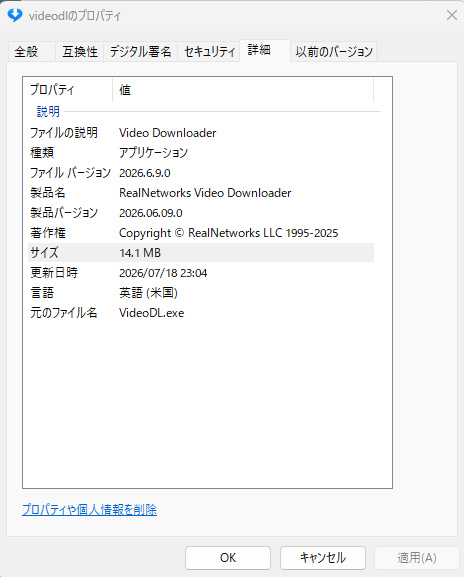
Right click on videodl and click Properties and then the Details tab.
Please provide us with the version number you see there.
Could you also provide us with a sample URL that you are unable to download and the web browser you are using?0 -
Dear Support Team,
Thank you for your email.
- The version information is 2026.6.9.0. (For your reference, I have attached Photo 1.)
- I am unable to download any videos from YouTube, TVer, or ABEMA. The following are sample URLs:
- https://www.youtube.com/watch?v=tMqVJBaOXns
- https://tver.jp/episodes/epiobqfmhg
- https://abema.tv/video/episode/571-1_s1_p1
- I normally use Google Chrome, but I have also tried Firefox and Microsoft Edge, and the videos cannot be downloaded in those browsers either.
Thank you for your assistance. I look forward to your reply.
 0
0 -

I’m experiencing a very similar problem on my end. The downloader either can’t recognize the video at all or stops partway through with an “unable to download” error. Based on other discussions I’ve read, this tends to occur whenever YouTube updates something, which can temporarily disrupt Real Downloader.
I’ve already attempted reinstalling and making sure everything is up to date, but the results are still unreliable—occasionally it works for a short time, then fails again.
0
댓글을 남기려면 로그인하세요.
댓글
댓글 3개