RealPlayer Freezes – A Problem and some general Feedback

In my humble opinion, I doubt that anyone in the “community” has a solution because I believe it can only be resolved by “fixing a flaw” in the RealPlayer program.
When trying to play a video file that is stored on the local hard drive, the RealPlayer now FREEZES when hitting the PLAY button for a chosen video, and the only way to “unfreeze” is to do a computer restart. Apparently the cause of this condition is shown in the following picture “screen shots” that show a RED DOT in the play-bar next to the play button that shows when the mouse is held over it that it means “Record next clip to my Library” which obviously is not what I want – only just to play the video.
By clicking on the red dot it would seem that the “process” could be made to “Stop Recording” and simply “PLAY” the video. The color of the dot temporarily changes from RED to GRAY but right away changes back to RED – O my, O my. At that point when trying to PLAY, the program FREEZES and NOTHING can be chosen – only doing a computer restart “un-freezes” the program.
I have done a complete uninstall including the “Library” and then a clean re-install, including rebuilding of the Library – and that does not resolve the situation.
----------------------------------------------------------------------------------

--------------------------------------------------------------------------------------------------
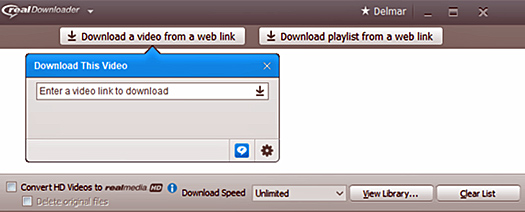
I think the problem may have been caused by my doing a YouTube “Download a video from a web link” rather than using the one-click download button – doing this to be sure to get a higher resolution High Definition file downloaded.
Now for the “feedback.” (Sorry for all of the moaning and groaning that follows – which is similar to some of the other “negative postings”)
It was said on their website – “Customer support cannot be reached by calling any of the office locations below. Our customer support page will provide you with assistance for any customer service, billing or technical issues you may have.” But there was no mention of using “EMAIL” and I wonder if using saas@realnetworks.com would work – probably not.
I see that there is no way to talk to a real live person for technical support for any problem – there use to be because I can remember talking to a live person many years ago. The least they could do is enable a person to send an email about a problem (they - that is anyone who knows how to solve problems – probably don't even read the "community" items to even know what is going on). A product WITHOUT SUPPORT is NO PRODUCT AT ALL. Another saying that applies here as well to support from some other companies is, “They should pretend to be a “customer” to see how it feels “to be on this end of the rope.”
-
Offizieller Kommentar

I've sent you an email. We'll take it from there.
Post ist für Kommentare geschlossen.
Kommentare
1 Kommentar