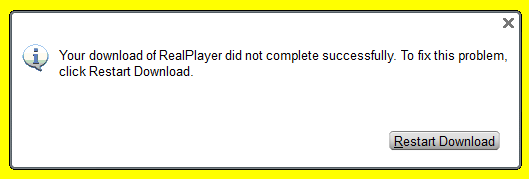
Error on Reinstall after RealPlayer got broken

-

It looks like something is broken with your installation process. What happens when you hit "Restart Download"?
To resolve your issue, please "over-install" RealPlayer. Over-install simply means installing RealPlayer over the existing RealPlayer. When you go through the installation process, you will be prompted that RealPlayer is already installed, simply proceed with the installation when prompted.0 -
Restart Download was done multiple times but to no avail. I kept getting the same error. I've done manually delete files and folders as suggested on Realplayer site, including find and deleted everything in registry with Realplayer settings. I also uninstall Java because some folks reported of tendency of breaking RealPlayer.
By the way, I am a certified PC tech '04. One can not ever say, you know everything in your field of knowledge. I always say, if not yet in my experience; I don't know anything.
But any help from you or any body regardless of experience, is much appreciated.
Thank You.
0 -
Can you try the following steps and let us know if it works for you?
1. Go to Control Panel and uninstall RealPlayer.
2. Go to https://support.microsoft.com/en-us/help/17588/fix-problems-that-block-programs-from-being-installed-or-removed and download and run the installer.
3. Once the Fixit program opens, click Next.
4. Select Uninstalling.
5. You will see a list of programs installed. Scroll down and look for "Video Downloader". Select that and click Next and click on "Yes, try uninstall". This will remove the application.
6. Run the Fixit program once again. (You will need to run this program a few times)
7. Follow steps 4 and remove the following programs (in the said order)
a. RealUpdgrade 1.1
b. RealDownloader
c. RealDownloader
Note: You have to run Fixit each time you want to uninstall these applications.
8. Delete Real & RealNetworks folders from
a. C:\Program Files (x86)
b. C:\Programdata
c. C:\Users\<your username>\AppData\Roaming
d. C:\Users\<your username>\AppData\LocalOnce you have uninstalled all of them and deleted the folders, restart your computer. Download RealPlayer from www.real.com. Ideally, this should install properly.
Please do let me know how it goes.
0 -
I have seen your suggestions before and this time around I made sure I follow your detail instructions. But I still have the exact same error.
Thanks for your continuous supports.
0 -
We sent you an email. We'll take it from there.
0
Post ist für Kommentare geschlossen.
Kommentare
5 Kommentare