slow downloading

Very slow downloading on Google Chrome. I have Windows 8.1 with 150 download speed
0
-
Official comment

Please try the "download from a weblink" method and let us know if you're experiencing the same:
- Copy the URL of the video from the address bar.
- Select "Download This Video" to get the RealDownloader pop up.
- Click the "x" in the RealDownloader on that video to cancel the current download.
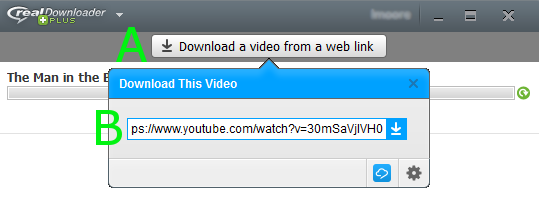
- In the RealDownloader, select the "Download a video from a web link" box [A].
- Paste the web link to download [B] and click the down arrow. The downloader will search for the video and automatically download it.
Post is closed for comments.
Comments
1 comment