My RealPlayer - download

i updated my real player then I up graded I can't down load from YouTube to change to MP3 any more I'm on windows 10 and google chrome I could download before I did up date can you help me please
ms j maclean
-
Official comment

Hello,
If the the Download This Video option does not appear, please follow the instructions from the article below and also click on the hyperlinks at the bottom of the article to see all the instructions (depending on the web browser used): https://customer.real.com/hc/en-us/articles/204040433
If the issue persists or if I misunderstood it, please provide the following information:- What Operating System is installed on your computer (Windows XP, Vista, 7, 8, 8.1, 10)?
- What version of RealPlayer is installed on your PC? (Here's how to check the version: https://customer.real.com/hc/en-us/articles/204039513)
- Which Internet browser do you use: Internet Explorer, Google Chrome, Mozilla Firefox? Do you experience the same difficulties while using all the Internet browsers?
- Is this happening to all videos, on all sites or just with a particular one (YouTube)?
- Do you receive any error messages? What is the exact message that appears on your desktop?
- Please send us screen shots showing the steps you follow and the results. To find out how to take a screen shot, please follow the steps from this article: https://customer.real.com/hc/en-us/articles/204039473
The more specific you are, the better I will be able to assist you.
-
I don't see the download button so I can't down load music video s to covert to MP3 as I paid for real player I would have expected this to work however if if can't be fixed I would like a refund please
J Maclean0 -
Hello,
1 - If you're using Google Chrome, Firefox or Edge, please follow the steps below:
a) Go to Local Disk C:\Program Files (x86)\Real\RealDownloader.
b) Double-click on downloader2.exe (see the attached screen shot).
c) Restart your computer. The download drop-down button should now appear at the top of your browser.
2 - If you're using, Internet Explorer, follow these steps: https://customer.real.com/hc/en-us/articles/206030987
Note: I would like to offer you another method of downloading: With the player open on your desktop, click the logo in the upper left and select Download a Video – this opens the RealDownloader and you can paste in the URL of the video you wish to download; please see the attached screen shots:
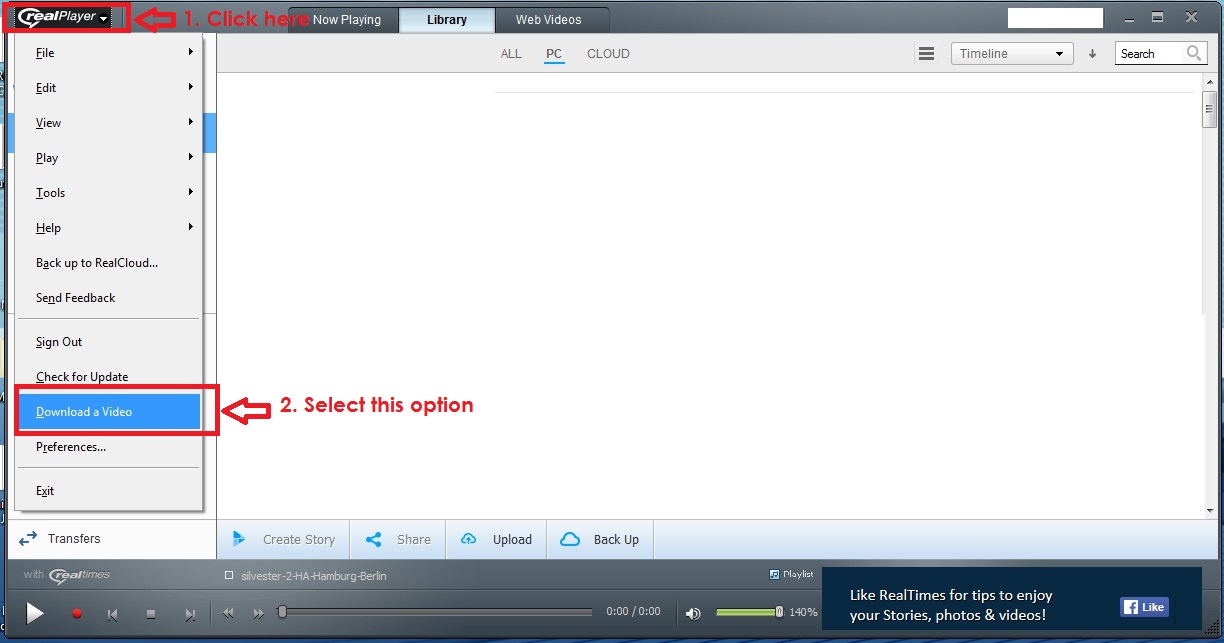

Please also note that the download option is one of the free features (see: https://customer.real.com/hc/en-us/articles/204039343)
0
Post is closed for comments.
Comments
3 comments