Ran update for RealPlayer and it deleted entire program... now I can't reinstall it

Why did update delete player?
Why can't I reinstall it after several attempts?
-
Official comment

Hello,
Please install RealPlayer in Safe mode by following these instructions: https://customer.real.com/hc/en-us/articles/231760587
Note: For more information on how to boot up your PC in Safe Mode, please consult this video: https://www.youtube.com/watch?v=L_N9riV8jl0; additionally, make sure to select the ''Network'' option under the ''Safe boot'' option (for reference, see the attached screen shot).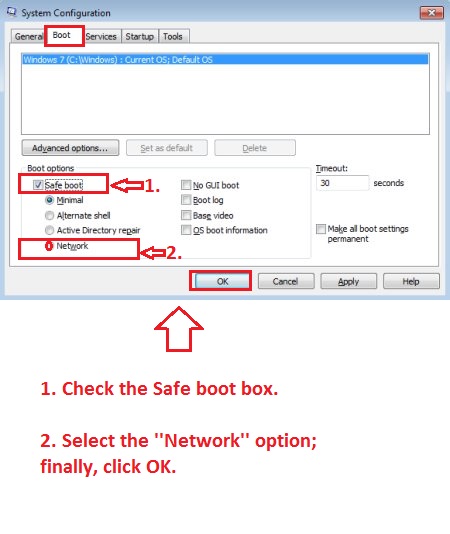
-
Thank you!! This actually worked! Unfortunately, now I have another problem. Every time I insert a CDR the entire computer freezes up and I have to manually shut down the computer. Is there now something wrong with my DVD/CD tray in my tower or is this a software problem?? Did the problem with RealPlayer initiate a problem with my hard drive?
0 -
Hello,
1 - If RealPlayer freezes or hangs when you try to burn a CD, please follow these instructions: https://customer.real.com/hc/en-us/articles/204040953
2 - If you're dealing with system crashes and freezes, the following instructions should help with the issue: https://customer.real.com/hc/en-us/articles/204040113
3 - If the issue persists despite following the above steps, please provide the following information:
- What Operating System is installed on your computer (Windows XP, Vista, 7, 8, 8.1, 10)?
- What steps do you follow and exactly when does the program crash?
- Do you receive any error messages? What is the exact message that appears on your desktop?
- Please send us screen shots showing the steps you follow and the results. To learn how to take a screen shot, please follow the steps from the article below: https://customer.real.com/hc/en-us/articles/204039473
0
Post is closed for comments.
Comments
3 comments