Real playerès rmhd format

I'm using the free version of Real Player. When I record a video it saves high definition files in the rmhd format. The free RP version does not appear to have the capability to convert rmhd formats to mp4. Nor does it have a Setting option to allow me to choose .MP4 as a default.
I can't find other apps that can convert rmhd to .mp4
Any suggestions on how to resolve this shortcoming in Real Player's free version?
-
Official comment

Hello,
It looks like you selected the ''convert HD Videos to RealMedia HD'' option during the download and that's why the downloaded files are saved in RMHD format. To prevent videos from converting to RMHD you just need to uncheck this option box in the RealDownloader window. See the screenshot:
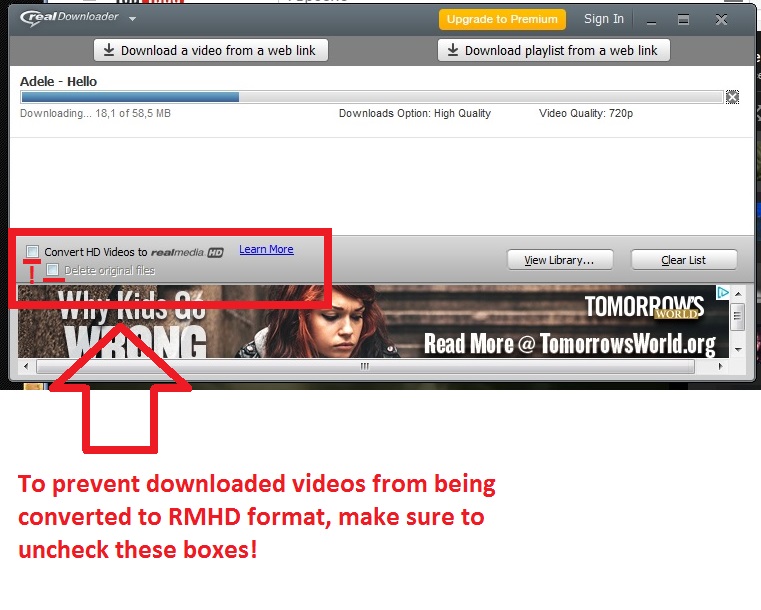 Additionally, you should be able to convert these files to MP4 -- for more information see: https://customer.real.com/hc/en-us/articles/204042083
 -
This answers my question. Why wasn't I able to find this answer on the Real Player app itself?
0 -
Hello,
I am glad to hear that the provided information was helpful.
I would also like to add that in case of difficulties you can always visit our Knowledge Base: https://customer.real.com/hc/en-us, which contains hundreds of articles to help you use the program. For more Knowledge Base search tips, click here: https://customer.real.com/hc/en-us/articles/204915628
0
Post is closed for comments.
Comments
3 comments