Why Does Real Player Have MALWARE inside it?

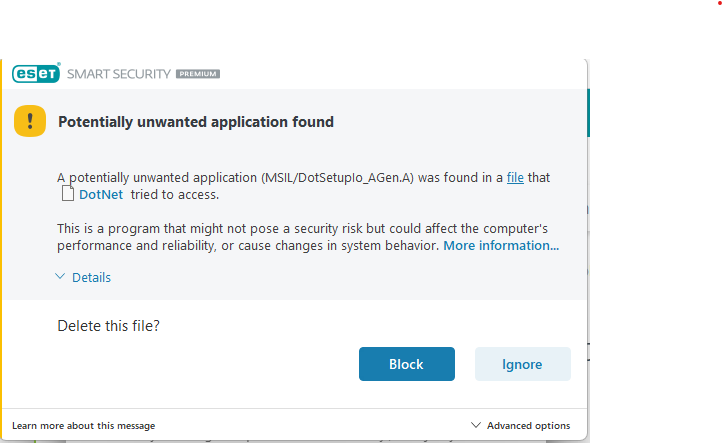
When downloading LATEST real player, my Antivirus alerts me of:
Potential unwanted app found and ask for action.
I went round and deleted Real Player Install file, and did full scan, it did a couple to installations i did before same alert.
It took full scans, complete uninstall of Real Player in entirity. and another full scan.
I dont know if its from the additional softwware thats offered along with real player.
After all this I AM NOT DOWNLOADING AGAIN FROM RP, ever!
From all the failure of downloads and every few days, havin to download new versions, waiting for you tube to block us again, It Has Become a complete Cesspool. NEVER AGAIN> Goodbye.
-

I'm experiencing the same errors on both my laptop and PC, which rules out a Windows 11 issue. It seems like the downloads are failing possibly due to the fact that they haven't been tested by RealNetworks. Since my system clock is auto-synced with Microsoft, that might be playing a role in causing the problem. I’ve included screenshots for better context, and I would appreciate any insights or suggestions. Visit this site: nome invisível tiktok
0 -
 I'm now encountering the same errors on both my laptop and PC, so it's not a Windows 11 issue. I suspect the downloads are failing because they haven’t been tested by RealNetworks. My system clock is auto-synced with Microsoft, which might be contributing to the issue. I've attached my screenshots for reference. Visit this site for more details: adhar login0
 -

I’m now getting the same errors on both my laptop and my desktop, so it’s not just a Windows 11 problem. I think the downloads are failing because they haven’t been approved or tested by RealNetworks. My system clock is set to sync automatically with Microsoft, and that might be part of the issue. I’ve attached screenshots to show what’s happening. For more information, visit this site: Uidai
0 -

I have gotten this error every time I have installed RealPlayer for years.I would have thought you would have fixed it by now.
McAfee alerts about it as well.
 -----------------------------------------0
 -
Yes me too.
I thought it was associated with the second programme, that tries to install, asking permission.
I always tick NO Thank you, but get the PUP in my security app, telling me a programme tried to install
and was blocked by my security app.
I could be wrong.
0
Post is closed for comments.
Comments
5 comments