Still can't download videos from YouTube

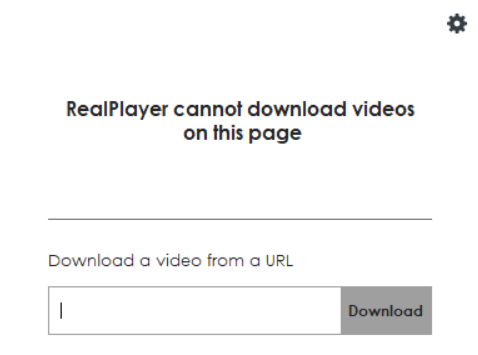
I received an email with instructions, but still can't download YouTube videos. I get the blue Realplayer dropdown prompt, but the larger orange dropdown realplayer prompt symbol does not drop down. I click on the blue and it opens a box searching for your video, "realplayer cannot download videos on this page." - Download a video from a URL
-
Commento ufficiale

With regards to the inability to download videos, we were able to identify the root cause and our engineering team was able to resolve it. To be able to download videos again, please follow these steps.
1. Attempt to download any video of your choice (You will still have the same error).
2. Simply restart your computer.
3. Upon restarting your computer, the Downloader will be updated in the backend and your downloads should start working.
If the issue still persists, please let us know. -

Same here. I just update windows 10 and real player and now all of sudden on all my browsers I get this message realplayer cannot download videos on this page on YouTube. On Facebook it seems to work. Real player you really need a customer service phone line or email that we can directly email you.
1 -
I agree with you 100% Vince; Real Player needs a customers service phone line or email that can monitor reply's and give solutions. Otherwise, it's like hitting a brick wall if the 1st solution they suggest doesn't work; like "Hello, anybody out there, anybody home?!"
0 -

folloed the instructions , restarted my computer and still no downloading on youtube!!!
0 -

I have exactly the same problem as above. A help email would be a great help. The drop down is now blue on drop down, instead of the orange it was previously.
0 -

Having same problem. Youtube "cannot dowload videos from this page." Have uninstalled and reinstalled realplayer and google chrome and edge then back to chrome. Have followed restart instructions. Still does not work. Please fix this.
0 -
If the bellow instructions were followed correctly, the version should be 2023.2.17.0.
1. Attempt to download any video of your choice (You will still have the same error).
2. Simply restart your computer after this.
3. Upon restarting your computer, the Downloader will be updated in the backend and your downloads should start working.
Please check your version after this. You can go to C:\Program Files (x86)\Real\RealPlayer. Right click on videodl and click Properties and then the Details tab. The version number is found here.
If the number has not changed and still shows 2022.10.6.0, it means Windows is blocking the update.
Please note: These instructions won't work for older versions such as RealPlayer v.18 or older. Versions 18 or earlier have reached end of life support.
0 -
Mine still shows the 2022.10.6.0 version.
How do we stop Microsoft blocking the update, or can we uninstall this version and install an older version and turn off updates?
0 -
I went to realplayer account setting. There is gave option to connect with google. I pushed the connect button and was told my google that realplayer was blocked for trying to access personal information. I tried to find a way to "link" realplayer program with google to bypass security but have not been able to find a way. Has realplayers new update violated some google rule and lost the "linked" program access?
0 -
Please follow these additional steps to resolve your issue.
1. Open a Windows folder
2. Go to C:\ProgramData\Real\RealUpgrade
3. Delete all the files in this folder (Caution: Please make sure you are deleting these files correctly and not any other files in a different folder)
4. Restart PC.
5. Follow the 3 steps we originally provided again.
6. Restart PC once more. (This should update the videodl)If the issue still persists, please let us know.
Please note: RealPlayer v.18 or older versions have reached End of Life support. Please upgrade to RealPlayer 22.
0 -
I have tried your latest instructions, but it is still the same.
Has it worked for anyone else?
0 -
p e, what version of RealPlayer do you have and what is your operating system version?
0 -
Operating system is Windows 10 Pro 22H2 (OS build 19045.2604) and the version of real downloader is 22.0.1.307latest update for videodl. is 2022.10.6.0.
I uninstalled it yesterday, downloaded the file again and reinstalled. Turned the PC of and on again, but still the same.
It is a mystery why it won't update past this version. For memory the old drop down box at the top of the screen was orange, not blue.
In the log file the second last line reads "VideoDownloader package root folder does not exist"
Would this be having the effect of stopping the update?
Thanka again.
0 -
p e, we sent you an email. We'll take it from there.
0 -

Hello... just to inform you that my Realplayer can't download video from you tube since today
0 -

Same here from me, yesterday working fine
0 -

I've noticed the same thing. I was running RealPlayer 24.0.3.312 on Windows 11 Home Edition. I uninstalled RealPlayer and then downloaded the installer from real.com. When I ran the installer, it said there was the same version already installed and did I want to overwrite it. I answered, "Yes," and let the installation finish. Now I can download YouTube videos again. I don't know what the problem was, but this seemed to fix it.
 0
0 -

Same for me as well. It worked on other websites, but not Youtube. Even after updating everything, following the link above, and restarting the system, etc., still the same "cannot download" message. Then I followed Thomas Paine's post above (thank you), instead of following the link above for the earlier fix, I just reinstalled the RealPlayer24 without separately updating the downloader, and now it works again.
0 -
We have fixed this issue. Please follow the instructions from this link to update your Downloader.
https://customer.real.com/hc/en-us/articles/8980592526747-Update-RealDownloader
0 -

I am experiencing the same problem mentioned above. It would be very helpful if someone could provide a support email. Also, the dropdown color has changed — it is now blue when opened, whereas it used to be orange before.
0 -

A lot of video editors prefer Alight Motion because it offers smooth animations, layers, and powerful editing tools. However, editing on a mobile screen can sometimes feel limited, which is why many users search for Alight Motion on PC. Using the PC setup makes it easier to manage timelines and effects while creating longer videos. I recently came across a detailed guide that explains Alight Motion PC version, installation steps, and useful editing tips for Windows users.
0 -

It’s likely that RealPlayer no longer works properly with YouTube, especially if only the small prompt shows up. Try checking extension permissions or updating to the latest version. Fixing these issues can be time-consuming, I usually take a break and play Drift Boss before getting back to it.
0 -

Honestly, I’ve had the same issue lately too—YouTube downloads just keep failing no matter what I try. I even took a break and ended up browsing random threads like sweep usa while testing different fixes, but still no luck so far. Might just be some update breaking the tools, hoping it gets sorted soon because it’s pretty frustrating.
0
Il post è chiuso ai commenti.
Commenti
23 commenti