unable to download videos from U Tube

I have Real Player and am up to date,
I can not download from Real Player as the
Pop Up Window does not show up.
I have attempted to down load from U Tube
and get a; "No Video To Down Load On This Page."
I have ran through the T/S Steps with no success.
Had similar issues recently and Tech Support walked me
through updating Real Player Down Load.
I believe after My Windows 10 up-dated recently
the problem returned.
I would prefer a walk through again to resolve issues.
-
Official comment

Please try updating RealDownloader manually:
- Right-click on the Windows icon in the bottom left corner, then click Command Prompt (Admin).
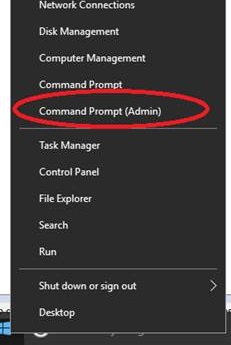
- Manually go to the RealDownloader folder through the command prompt (see the image below for the commands).
- Type videodl.exe –U (Note: U is in upper case and the command is case sensitive)
- Restart your computer after it updates.
Below is what you should see:
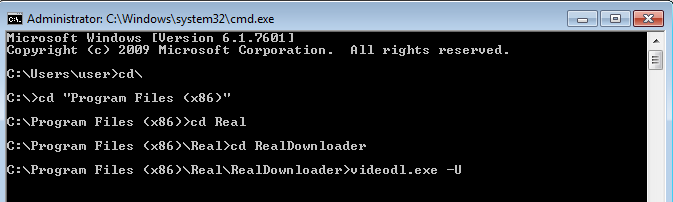
This command (videodl.exe –U) is case sensitive. If you type videodl.exe –u, you will get the error "-u option requires an argument."
Tip--if you are not sure how to navigate to folders in Command Prompt:
In the command prompt, type "cd <space>" then first few letters of the folder and press Tab. Keep pressing the Tab key until it shows the folder you need and press Enter. Do the same if you want to go into sub-folders.
- Right-click on the Windows icon in the bottom left corner, then click Command Prompt (Admin).
-

C:\Program Files (x86)\Real>cd RealDownloader
The system cannot find the path specified.C:\Program Files (x86)\Real>cd RealDown loader
The system cannot find the path specified.C:\Program Files (x86)\Real>\RealDownloader>videol.exe -U
Access is denied.0 -

William,
This is a very old post. These instructions don't work anymore. Closing this post but feel free to start a new post.
0
Post is closed for comments.
Comments
3 comments