827haneghan

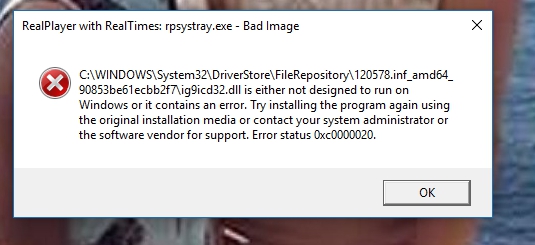
This page stopped responding the first time I tried this . I am getting two popups all the time about program errors . I was having trouble with Malwarebytes also . Their tech Support said they come from a corrupted file in RealPlayer . I uninstalled RealPlayer and installer it again but that hasn't helped .I noticed that if I have RealPlayer open when I get either of these error messages that when I close the message the RealPlayer icon in the tray blinks of and on again . I like RealPlayer so I paid for it and now I might have to delete it if this can't be fixed . These are the problem . .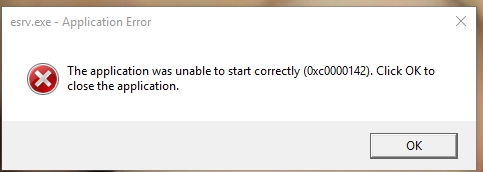
-
Official comment

Please try the following solution:
1. Uninstall RealPlayer as explained here: Uninstall and reinstall RealPlayer on Windows
2. Next, delete the RealPlayer application folders as explained here: Delete the RealPlayer application folders (clean uninstall)
3. Now run the following Microsoft Fix-it program: https://support.microsoft.com/en-us/help/17588/fix-problems-that-block-programs-from-being-installed-or-removed
4. Restart your PC.
5. Download a fresh copy of RealPlayer by visiting: http://www.real.com/
Post is closed for comments.
Comments
1 comment