Hide People icon during video playback

Is there no way to hide the superimposed People icon in the upper left corner of the video playing in RealPlayer 20/20 v 20.0.2.314? It is kind of creepy seeing it there blocking the video like an ad. With no ability to control this by the user in the View tab or the Preferences > People Search tab, the software becomes worthless because it is like throwing mud onto the screen.
-

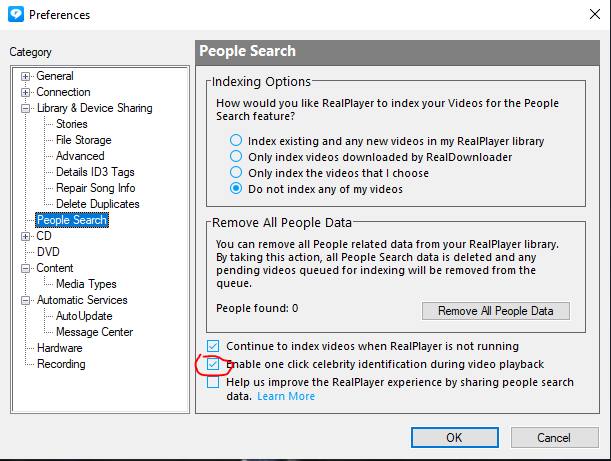
You can disable this in the Preferences. Please see the screenshot below and uncheck "Enable one click celebrity identification during video playback" and restart RealPlayer.
 0
0 -
It is and has been unchecked:

Here is a screenshot well into the video with the icon still in place despite the "Enable celebrity identification" option being unchecked:

It is possible to try to "shake off" the icon by hovering the mouse pointer over the video and then relocating the pointer to the side of the video, but the default behavior when starting a video is for this icon to be covering part of the video.
0 -
Brian,
That is very strange. Can you please restart your computer and try again? We feel that though the setting is unchecked, it has not really unchecked it self.
Please let us know if that helped.
0 -
Just as I shut down my computer every day, I shut it down again just now and restarted it. Same issue. The "Enable celebrity identification" option does not effect the appearance of this icon:

Whether I use Ctrl-P or I press the Play button on the GUI to start the video, the result is the same. But like I said, if you can get the bottom Upload/Share/Details pane to appear while the video is playing (by moving the pointer into or outside of the player after playback begins) and have it block part of the video for a few seconds, you effectively "shake off" the People icon, because the icon disappears simultaneously with the U/S/D pane. However, this is no solution. The user should not have to do that.
I agree that this is strange, so if you do not have a solution, I understand. I do not wish to do any more troubleshooting. Perhaps other users will report it and it will be fixed within the next release of the program.
0 -
We have not had this issue before. We just sent you an email. We'll take it from there.
0
Post is closed for comments.
Comments
5 comments