Set burning speed4x

Hi there, I set my burn speed to 4x, clicked ok, ok, but, when the program went to actually burn my cd it said 10x?? i have gone thru a stack of cd's, i did uncheck the test mode button.
Please help
thaks
jack g
-

If you want to set your burn speed at 4x, you have 2 places where you need to make this change.
1. Under Preferences
2. When you burn a DVD
To make the change under Preferences, please follow these steps:
1. Open RealPlayer
2. Click the logo (top left corner) and click Preferences
3. Expand CD and click CD Burner. Here you can change the Write speed.
4. Click OK to close Preferences window
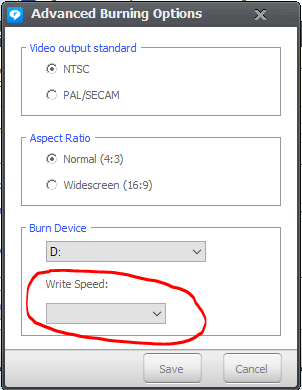
To change the burn speed just before burning a DVD
1. Add files to your burn tab
2. After you click Burn Video to Disc, you will see another window pop up named "Video Burning Options" - Here click Advanced Options
3. You can change the Write Speed here as well.
See screenshot below
 0
0
Post is closed for comments.
Comments
1 comment