c++ runtime error

When I open real player file I got a message below twice. Then the video starts. Most often only once and then the application freezes. I have re-installed the application and tried to inactivate all non-windows services. No effect. What to do? I have paid for plus-application
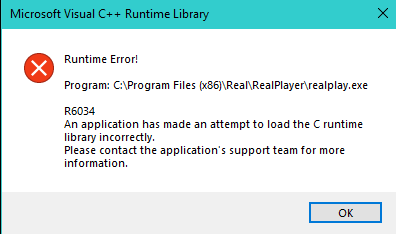
-

Do you have a program called AOMEI Backupper? This program conflicts with RealPlayer.
As a workaround, you can follow these instructions to resolve the issue.
1. Right click on My PC
2. Click on Properties (This should open System Properties)
3. Click on the Advanced tab and click Environment Variables button
4. Select the "Path" where you see "AOMEI Backupper" and click OK to close this window
5. Restart your PC and try to use RealPlayer again
If the issue persists, please let us know.0 -
Yes, I have AOMEI backupper. The path wasn't there as I had inactivated the backupper. The runtime error remained.
No I have uninstalled the backupper anr realplayer works fine again.
When can you fix the conflict with AOMEI backupper so I can re-install it again ? (I run W10 latest version1909)
0 -
Our engineering team is working on it. We don't have an ETA at this time but it surely will be resolved.
0 -

Have you solved the problem in the meantime? It is very annoying to always click away the runtime error!
0
Post is closed for comments.
Comments
4 comments