Burning Audio CDs

I recently paid for a premium subscription to Real Player after more than a decade of not using the service. The main reason for my purchase was to burn audio CDs with crossfaded tracks. The problem is, this feature does not work. I try to create a playlist to then convert to a CD and I get an error message saying the media type (MP3) is unsupported. My entire collection of music (over 300,000 songs) is MP3 files. When I troubleshoot the issue, I am told I do not have the correct plug-in to burn audio CDs. How do I get these plugins? Do an update? When I tried that, I am told there are no updates available and have the latest version of the software. I can't even play MP3 files in Real Player which I find unacceptable.
All I want to do is burn CDs with my current MP3 collection. If this is not possible, I must request a refund for the full $39.99 amount and be done with Real Player.
Please advise at your soonest.
-

Is this happening only when you use the crossfade function? What happens when you don't choose this function? Are you still being prompted of a codec plugin? We don't think there are any codec plugins for crossfade.
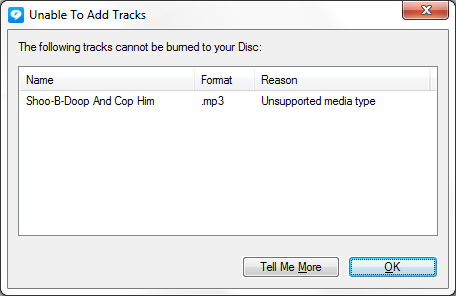
Can you please send us a screenshot of the error message?
0 -
This happens when I drag a file to Real Player to create the CD, it happens when I try to double click the file within Real Player to play the file. I have chosen this function because your website described the feature as part of the service when I paid the subscription fee. For me to NOT choose that option defeats the purpose and if that feature does not or will not work, I would have to ask for a prompt refund. I have included a screenshot of the error message as requested.
Best regards,
 0
0 -
It is possible that the MP3 file is corrupted. There is a solution for this.
Please use RealConverter and convert this file to WMV format and then try to add it to your burn list.
Please let me know how it goes.
0
Post is closed for comments.
Comments
3 comments