double ghosting on you tube videos

when i go to a specific contributor on real player i can still see the previous video list from the last page making it impossible to select the tracks i want as they are ghosted by the page i just left
i didnt have this problem on my old pc with windows 8 but now on windows 10 this problem has shown up after a couple of weeks on a new pc purchased in july this year i have tried reinstalling real player with no success i purchased real player 5 or 6 years ago and the old version was good
i await your response
-

Can you please provide us with a screenshot of what you are noticing? We are not able to comprehend the issue. In addition, can you please provide all the steps you've taken to get to the "double ghosting" issue.
0 -
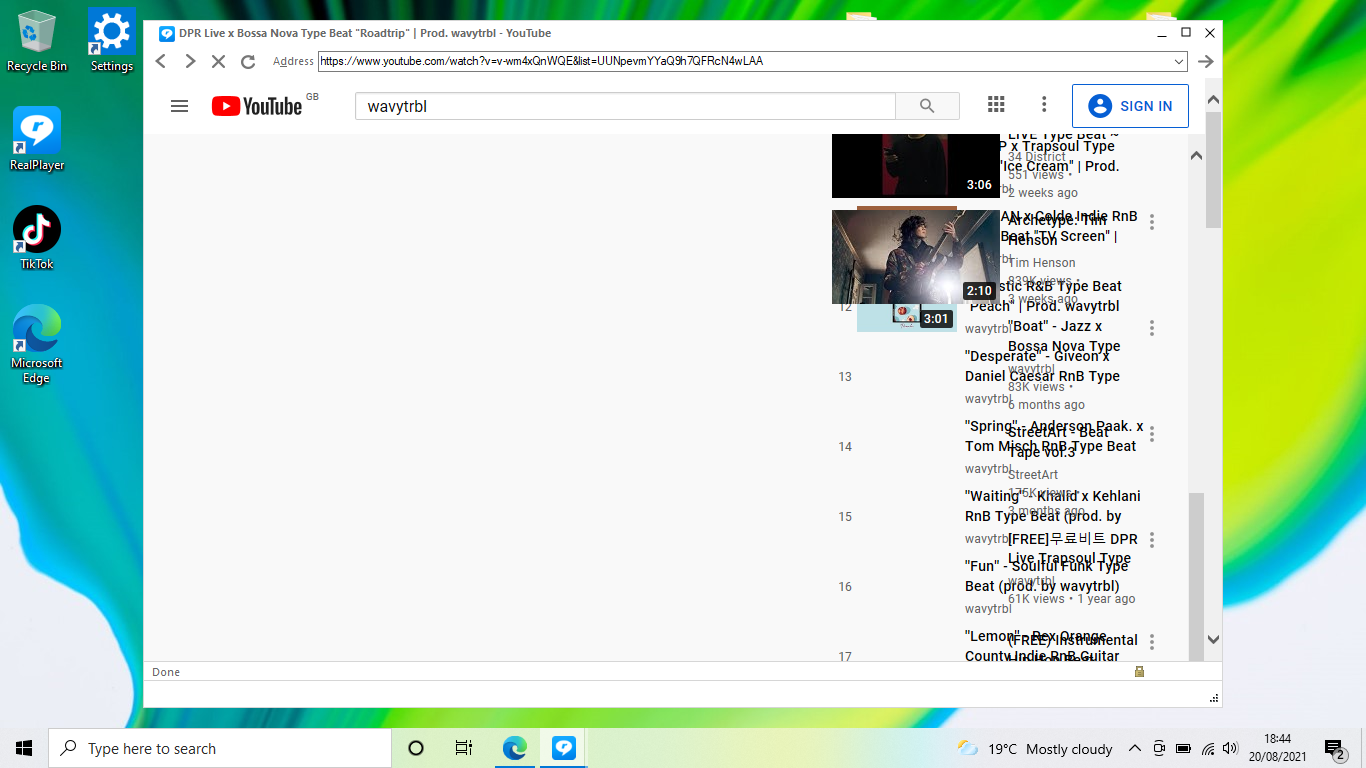 0
0 -
This may be due to your Windows cookies. You can follow these steps to see if that helps.
1. Open Internet Options from the search window.
2. Under General Tab, click Settings in Browsing History and click View Files. (This will open a folder with a lot of files. Select all and delete them).
3. Close Internet Options by clicking Ok.
4. Close all Windows
5. Restart your PCAlternately, you can use Edge, Firefox or Chrome and directly go to YouTube.
0 -
I have tried your recomendations without luck i have changed browser to google chrome
but now cannot sign into you tube as it is not a supported browser even though google own you tube
I had no problems to start with on my new pc purchased in early July but nothing seems to work
how can this be possible? it must be your programme as it has worked for years with great results
you said i could go directly to you tube via a browser but i do not get the download option if i dont go through Real Player
hope you can help Thanks
0 -
From your description, it appears that you are using Internet Explorer. Please note: Microsoft has stopped supporting this browser. You will have to use one of the following browsers:
- Google Chrome
- Mozilla Firefox
- Microsoft Edge
Since you mentioned that you used Chrome browser, can you please let us know what version of Chrome you are running?
Lastly, if the Downloader button is not showing up in your browsers, it is mostly likely that either it is disabled in Windows startup or your firewall program is blocking it.
To check if your Downloader is not disabled, please follow these steps.
1. Open Task Manager.
2. Click on Startup tab.
3. Look for RealDownloader and all other Real components and make sure they are set to "enabled".
4. Click Task Manager,
5. Restart RealPlayer and open a browser.If the issue still persists, please let us know which firewall program you are using.
0
Post is closed for comments.
Comments
5 comments